Run Pages
The run pages will automatically pop up on the information display after boot up if no trouble codes or alerts are present. If codes and alerts are present, they must be acknowledged before the run pages appear.
To navigate through the run pages, simply rotate the navigation dial to advance to the next screen.
Run pages allow the operator to observe two pre-determined and three customized pages of machine information. See “Layout Manger Settings” in this section for additional information about creating custom run pages.
RXA0153399-UN-17AUG16
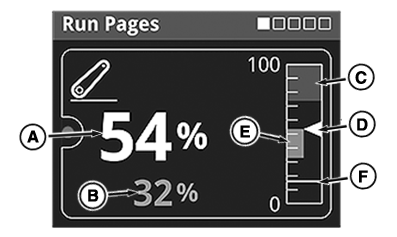
Hitch Run Page
A - Hitch Position Actual Value
B - Hitch Position Target Value
C - Upper Limit Indicator
D - Hitch Position Actual Indicator
E - Hitch Position Target Indicator
F - Set Position Indicator
The first page to display is the hitch run page and is not configurable. This monitors set point, upper limit, actual position, and target position of the rear hitch.
RXA0153401-UN-16AUG16
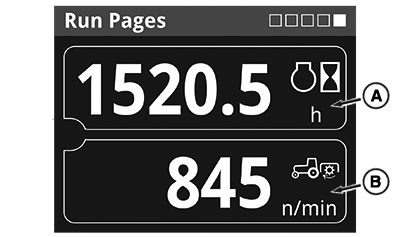
Custom Run Pages
A - Run Page Configurable Item 1
B - Run Page Configurable Item 2
Pages two, three, and four allow the operator to select from many options which information they would like to view.
The fifth page is not configurable and always shows engine hours as the top item and rear PTO speed as the bottom item.
|
DP51502,0002631-19-20160729 |