iTEC™ Basic Menu
NOTE: For additional navigation information, see “Basic Menu Navigation” in this section.
-

RXA0152963-UN-21JUL16iTEC™ Basic Menu

RXA0152965-UN-21JUL16Setup Selection
Locate the iTEC™ Basic menu and navigate to the setup selection. Depress the enter/accept button. -
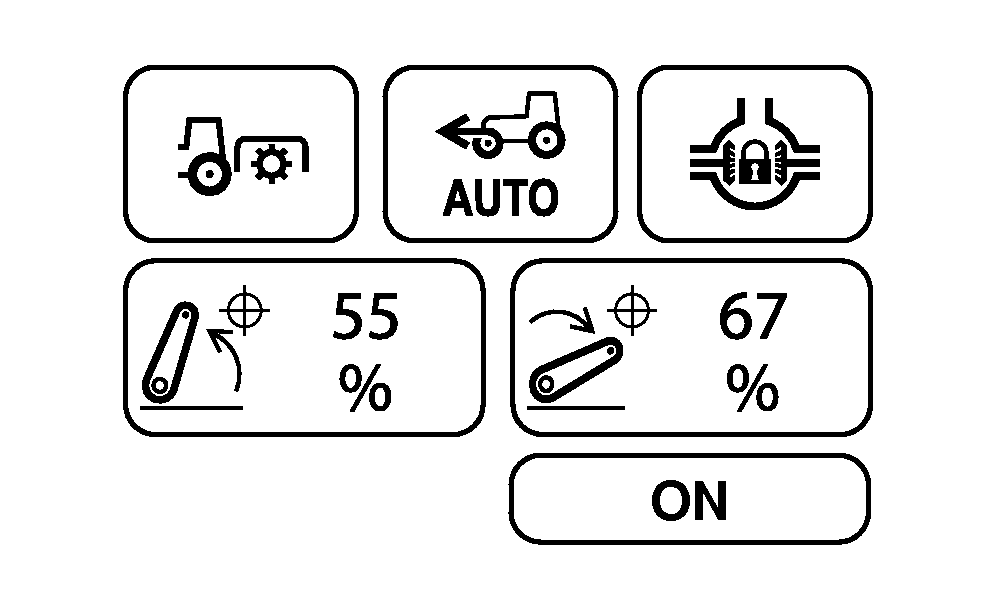
RXA0152964-UN-21NOV16iTEC™ Basic Set Up Selection
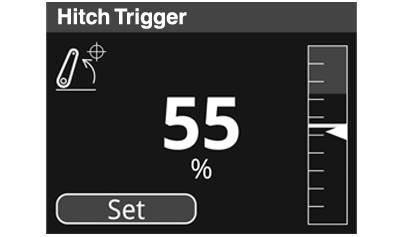
RXA0154430-UN-21NOV16Hitch Trigger Page
NOTE: Hitch Raise/Lower Trigger pages change the PTO ON hitch threshold and PTO OFF hitch thresholds.
Press set button on the hitch trigger raise page to set PTO OFF hitch trigger threshold at current rear hitch position. Similarly pressing set button on hitch trigger lower page sets PTO ON hitch trigger threshold at current rear hitch position.
Select and change the desired settings as needed. See the relevant topic in this section for additional details on settings.
Selection
Range
iTEC™ Basic Response
Rear PTO
Unassigned or Rear PTO.
Turns on the rear PTO when selected.
MFWD
Unassigned, MFWD, or Auto MFWD.
Turns on the MFWD when selected.
Differential Lock
Unassigned, Diff Lock or Auto Diff Lock.
Turns on the differential lock when selected.
Hitch Raise Trigger
10—100
Sets the PTO Off trigger point.
Hitch Lower Trigger
10—100
Sets the PTO On trigger point.
ON-OFF
On or Off
Used to activate iTEC™ Basic.
|
DP51502,0002636-19-20161121 |