Trouble Codes
NOTE: For additional navigation information, see “Basic Menu Navigation” in the Displays, Software, and Electronics Operation section.
RXA0153445-UN-19AUG16
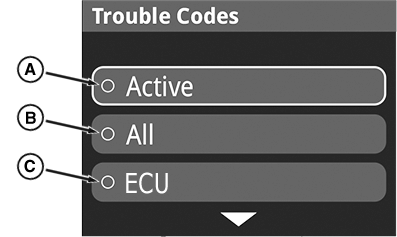
Trouble Code Menu
RXA0153446-UN-19AUG16
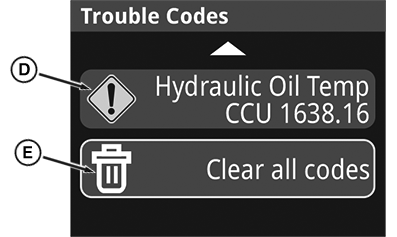
Trouble Code List
RXA0152424-UN-28OCT16
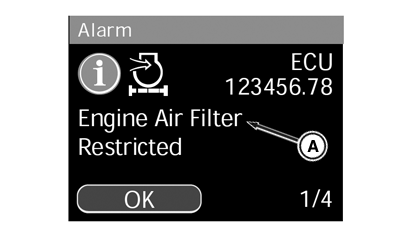
Example (Code Information)
A - Active Codes
B - All Codes
C - Control Unit Codes
D - Trouble Code
E - Clear All Codes Function
-
Access the trouble code menu, a list appears allowing the operator to choose which code groupings they want to see.
-
Active (A) - only the codes which are currently occurring on the machine.
-
All (B) - all codes that have occurred or are currently occurring. It is the selection which allows the operator to clear trouble codes.
-
Control unit acronym (C) (ECU - Engine Control Unit) - only shows codes related to that control unit.
-
-
Selecting All (B) provides the most information and allows for clearing of codes. Press the enter/accept button to navigate to the code list. It takes several seconds, possibly longer to pull all of the codes.
-
Once the list of trouble codes appears, navigate to and select a code (D) to find more information about it.
-
After selecting a code, use the navigation dial to scroll down the text if an arrow appears near the bottom of the page. Selecting “OK” at the bottom of the page acknowledges the code.
-
Return to the code list and review other codes as desired.
-
Once codes have been reviewed, scroll to the bottom of the code list and there is an option to Clear All Codes (E). Select this option and depress the enter/accept button to remove all of the stored and active codes.
-
The message “No codes stored” appears.
-
Use the back button to return to the main menu.
Contact your John Deere dealer for trouble-shooting assistance. Your dealer has additional access to the on board display and tools to diagnose and repair problems.
|
DP51502,000265F-19-20160817 |