Addresses
NOTE: For additional navigation information, see “Basic Menu Navigation” in the Displays, Software, and Electronics Operation section.
RXA0153447-UN-19AUG16
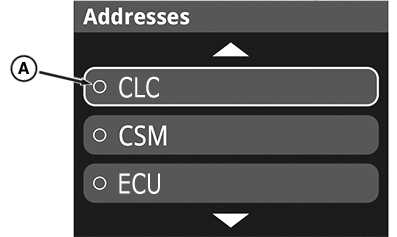
Control Unit Menu
RXA0153448-UN-19AUG16
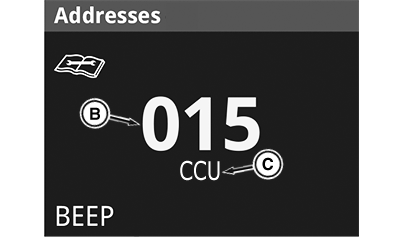
Address Page
A - Control Unit Selection
B - Address Number
C - Control Unit Acronym
-
Access the address menu, a list appears allowing the operator to choose which control unit they want to see.
-
Scroll down and choose the control unit selection (A) for the relevant information the operator would like to view or configure.
-
The page with the address number (B) and control unit acronym (C) opens.
-
Use the navigation dial to scroll through the addresses. Depress the enter/accept button to select an address to view additional information.
-
Address 1 is a list of stored diagnostic trouble codes for that selected control unit software. See “Trouble Codes” in this section
-
Address 2 is a beep mode. Operate a control device (switch, button, lever) to see an address number display, a value change state, and an audible beep.
-
Address 3—199 are various feature or function information related to status, configuration, and operation.
-
Address 200—251 are related to software and hardware numbers and versions.
-
-
If an address is configurable by the operator, there is an “Edit” icon in the lower right-hand corner. Selecting the edit option allows changes to the values used by the software. It is not recommended to change values unless the modifier fully understands what is being changed. Contact your John Deere dealer for more information.
-
After entering the edit mode, the enter/accept button moves the selection box and the navigation dial changes the value within the selection box.
-
After the value has been changed the back button navigates to a “Cancel” or “Save” screen. Depressing the back button again cancels changes and the enter/accept button saves changes.
Contact your John Deere dealer for trouble-shooting assistance. Your dealer has additional access to the on board display and tools to diagnose and repair problems.
|
DP51502,0002660-19-20160818 |