Operate Premium Radio
LV14597-UN-10AUG11
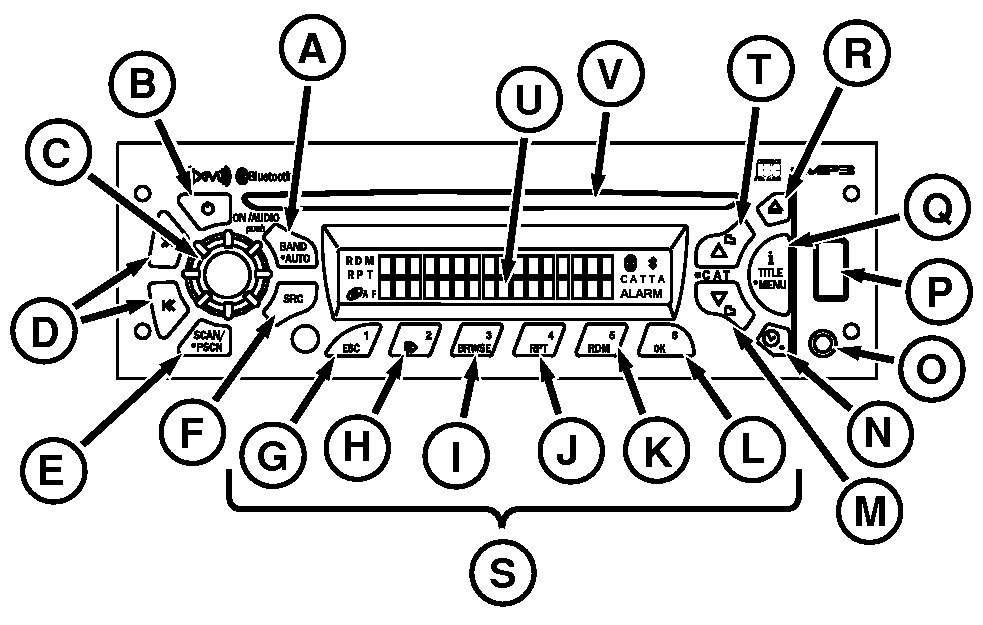
Radio
A - Band/Auto Button
B - Power
C - Audio Knob
D - Seek Buttons
E - SCAN/PSCN
F - SRC (Source)
G - ESC
H - Pause/Play CD
I - Browse
J - RPT
K - RDM
L - OK
M - Down Button
N - Clock/Alarm
O - Auxiliary Input
P - USB Port
Q - iTitle Menu
R - Eject
S - Programmable Stations 1—6
T - Up Button
U - Display
V - CD Slot
General Radio Functions:
Premium radio is equipped with:
- An AM band with 6 AM presets
- Two FM bands with a total of 12 FM presets
- Three satellite bands with a total of 18 satellite presets
- One weather band with 6 WX presets
Radio can be operated in any one of three modes:
- Radio on with engine running.
- Radio on with key switch On and engine Off.
- With the key switch Off, press radio power button. Radio plays for 1 hour, then turns off automatically.
Adjusting the Volume: To increase volume, rotate the audio knob (C) clockwise. To decrease volume, rotate the knob counterclockwise.
One-Hour Timer: With ignition off, press power button (B) or audio knob (C) to activate radio one-hour timer. Radio turns off after 1 hour. Press either button again to reactivate the one-hour timer.
Display: Radio displays time when off.
Band/Auto: Press Band/Auto button (A) to switch between FM1, FM2, AM, SAT1, SAT2, SAT3, and WX.
Seek: Press seek (D) (>> or <<) to switch radio to next higher/lower frequency.
Audio mutes during seek up-down process. Select either >> or << button while radio searches for signal. Tuner stops at frequency tuned. Seek mode ends when tunable station is found or seek is canceled. Radio returns to original station if Seek is canceled. If no station is found, seek continues searching until canceled.
To cancel seek:
- Switch modes.
- Change bands.
- Press Scan/Pscan button.
- Press any preset button.
- Press and hold Band/Auto button.
- Turn off power.
NOTE: Quickly pressing seek button causes radio to “tune” or search for the next higher or lower frequency and radio stops on that frequency even if no station is there. Holding seek button longer than half a second initiates the “seek” function. The “seek” function stops at the next higher/lower frequency with a strong radio signal and stops at that station. For example, changing from 107.1 to 107.3 by selecting the up button (T) or changing from 107.3 to 107.1 by selecting the down button (M).
Auto Store: Auto Store temporarily stores the six strongest stations on push buttons 1—6 (S). Press and hold Band/Auto button for more than 2 seconds then an audible beep is heard and Autostore appears on display. Press and hold Band/Auto button again to cancel Auto Store after original presets are restored. AS is displayed while Auto Store is active. Pressing Band/Auto button while listening in one radio mode does not affect presets in any other mode.
Scan/Pscan: Press Scan/Pscan button (E) to scan all stations on the current band. When a strong frequency is found, radio plays for 8 seconds before continuing to scan. To end the scan, press the Scan/Pscan button again. Radio beeps, then displays Scan plus the frequency currently tuned.
Press Scan/Pscan button and hold for more than 2 seconds to scan current band preset stations. Radio plays selected station for 8 seconds and then continues scanning. PSCN appears on display along with frequency, preset number, and current band. Preset scan continues until Scan/Pscan is pressed again.
Storing Preset Stations:
- Turn on radio.
- Select band.
- Tune desired station.
- Press and hold desired preset buttons for more than 2 seconds (radio is muted).
- When station is set, an audible beep is heard.
- Repeat process for each of the remaining six preset station buttons.
Playing Preset Stations: Press appropriate button 1-6 (G through L).
RXA0104593-UN-04SEP09
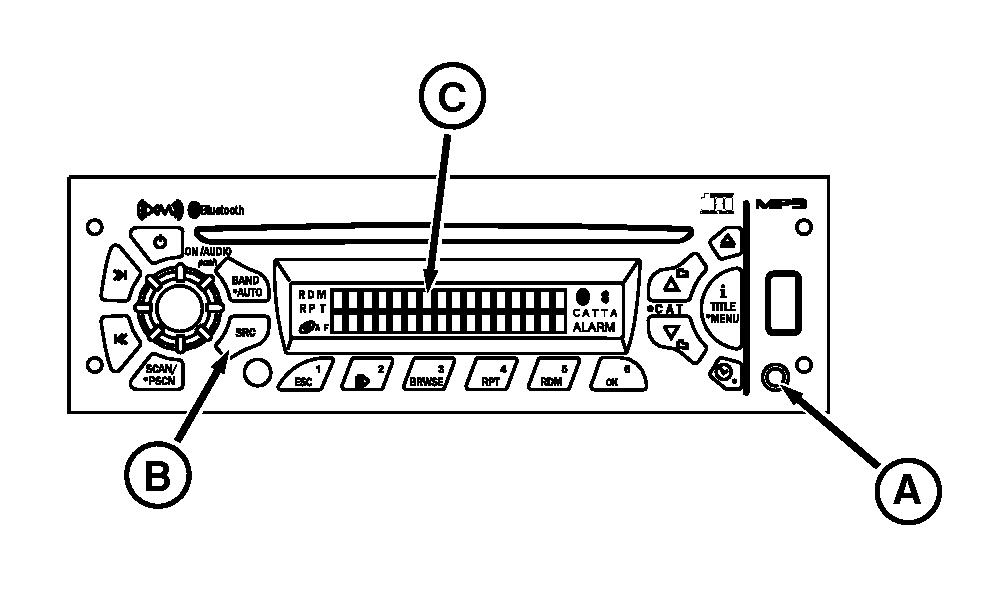
Radio
A - Auxiliary Input
B - SRC Button
C - Display
Auxiliary Mode: Play external audio devices connected via the auxiliary input port (A). Auxiliary mode is not an option until device is connected to the auxiliary input port. Press the SRC button (B) to find auxiliary device on the display (C).
|
DP51502,0002833-19-20161202 |