USB Mode
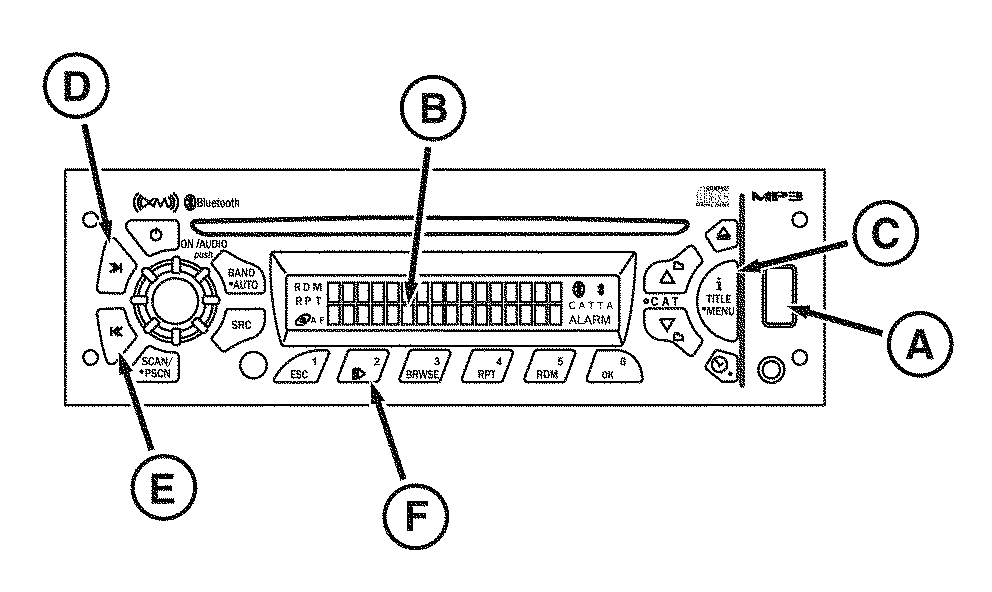
RXA0102616-UN-11FEB11
USB Mode Premium Radio
A - USB Connection
B - Display
C - iTitle Menu
D - Seek >>
E - Seek <<
F - Pause/Play CD
Premium radio controls and plays audio via USB devices (less than 1 GB) with the following audio formats: MP1, MP2, MP3 (VBR), WMA (ver 9 and VBR), and ACC (MPEG4 and M4A). Radio is able to read and play a maximum of 50 folders and play lists.s
Long files, folders, or a combination there of can reduce the number of files and folders that can be played. If device contains more than 50 folders or 11 folder levels, radio only accesses and navigates to the maximum number and ignores additional items.
- Insert USB device fully into USB connection (A).
- USB Reading appears on the radio display (B) and audio begins playing.
- File type, elapsed time, and track number are displayed.
- First track begins playing and continues sequentially through all tracks.
- After playing last track of the last folder, play continues at the first track of the first folder or root directory.
- To remove USB device, simply pull the device. Radio returns to previous mode/source.
When playing MP3 or WMA files, press the iTitle Menu button (C) to toggle between different display views:
- Track Number
- Artist Name
- Song Name
- Album Name
- Folder/PLST Name
Button Functions
SEEK >> (D):
- Press for less than 2 seconds to forward to the next track.
- Press and hold to fast forward.
- Release button, track continues to play.
SEEK << (E):
- Press for less than 2 seconds to go to beginning of the current track.
- Press within the first 10 seconds to go to beginning of the previous track.
- Press and hold button to engage fast reverse.
- Release button, track continues to play.
PAUSE/PLAY (F):
- Press to pause a track, “PAUSE” is displayed and audio is muted.
- Press again to resume playing the track.
|
DP51502,0002838-19-20161130 |