Transmission Controls and Operation
General Operation
 CAUTION: Avoid personal injury or damage to machine. If engine
starts with left-hand reverser lever in forward or reverse positions,
there is a malfunction in the starting circuit. Repair immediately.
See your John Deere dealer.
CAUTION: Avoid personal injury or damage to machine. If engine
starts with left-hand reverser lever in forward or reverse positions,
there is a malfunction in the starting circuit. Repair immediately.
See your John Deere dealer.
IMPORTANT: Prevent Transmission or Clutch Damage
- Never depress the clutch pedal while machine is rolling downhill or coasting, as serious transmission damage can result.
- Never attempt to start machine by towing or pushing.
- Stop machine completely before shifting to PARK position.
- Avoid excessive ballast.
- Clutch pedal must be fully depressed to disengage the clutch. Never rest foot on clutch pedal while machine is moving.
NOTE: Machine cannot be put in gear unless operator is seated. Information indicator illuminates and message appears on information display when Forward, Reverse, or Neutral positions are selected and operator is not in seat. To initiate motion, move lever from Park position to Forward or Reverse position with operator seated.
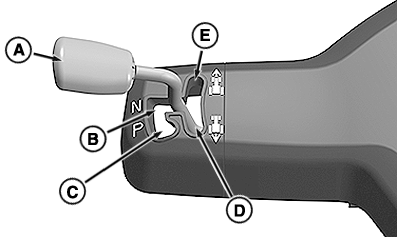
Left-Hand Reverser
RXA0153893-UN-05DEC16
A - Left-Hand Reverser Lever
B - Neutral
C - Park Position
D - Reverse
E - Forward
NOTE: If machine is started with the left-hand reverser lever in any position except Park (C) it defaults to Neutral. The reverser lever must be cycled to Park before commanding a direction.
The primary direction control for the machine is the left-hand reverser lever (A). After the engine has been started, the left-hand reverser lever can be moved from Park without using the clutch. Direction changes also do not require use of clutch.
The primary display displays “P” for Park, “N” for Neutral, “F” for Forward, and “R” for Reverse. See “Transmission Indicators” in this section.
When forward or reverse are selected and the lever is released, the lever returns to a position between forward and reverse. Even though it does not appear as if the lever is in forward or reverse, the machine moves in the selected direction.
- Park Position (C): In Park position, the park brake engages preventing machine movement. See “Park Brake” in this section for more info.
- Neutral (B): When placed in the Neutral slot, the machine can move, even on level ground.
- Forward (E): Placing the reverser lever in Forward initiates forward movement. Machine begins shifting to selected gear or set speed depending on shift lever position.
- Reverse (D): Placing the reverser lever in Reverse initiates backward movement. Machine begins shifting to selected gear or set speed depending on shift lever position.
Shift Controls
RXA0153895-UN-19SEP16
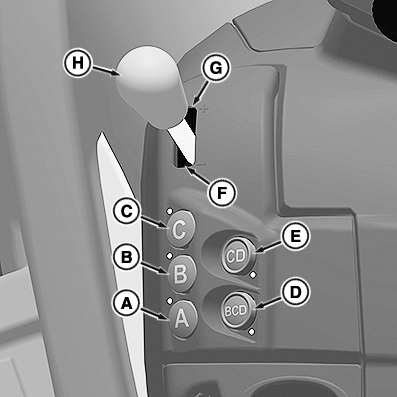
Shift Controls without Auto
RXA0153894-UN-19SEP16
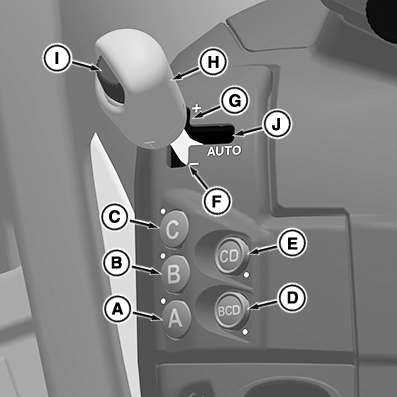
Shift Controls with Auto
A - A Range Button
B - B Range Button
C - C Range Button
D - BCD Multi-Range Button
E - CD Multi-Range Button
F - Manual Downshift
G - Manual Upshift
H - Shift Lever
I - Set Speed Control Dial
J - Auto Position
NOTE: Ranges can be changed at anytime without the use of the clutch pedal.
The primary display indicates the operator selected range and gear, as well as the actual range and gear the machine is in. Set speed and Auto mode are also displayed. See “Transmission Indicators” in this section.
- A, B, and C Range Buttons (A, B, C) - Select one of the range buttons for applications where range changes are not required. Selecting the “B” range button allows shifts through the range (Forward B1—B4 for 16/16, Forward B1—B8 for 32/16, and Reverse B1—B4 for both). The transmission defaults to the last selected forward or reverse gear for the range selected. Changing ranges with significant draft load results in interruption of ground speed.
- BCD Multi-Range Button (D) - Select the BCD multi-range button for applications where starting at a low gear is required to achieve higher speeds. An example is towing heavy loads at transport speeds. The transmission defaults to the operator selected start gear. See “Transmission Settings” in this section. The operator can shift up and down gears throughout the B, C, and D ranges freely using the shift lever (H). The transmission shifts through all three ranges as well.
- CD Range Button (E) - Functions like the BCD button with the exception that the B range is excluded.
- Manual Upshift and Downshift (F and G) - Shift up and down gears by simply pushing forward or pulling rearward on the shift lever (H).
- Shift Lever (H) - The transmission shifts up (+) or down (-) one gear at a time if shift lever is cycled forward or rearward and released. The lever can be bumped up or down in succession to shift through several gears, the transmission catches up with the operator requested gear. Holding the lever in either direction accelerates gear changes at a faster pace. When in a multi-range mode, a double bump of the lever changes to the next range.
- Set Speed Control Dial (I) - Used to set the desired ground speed when the shift lever (H) is placed in the Auto position (J). The machine adjusts the throttle, range (in multi-range mode), and gear to maintain the set speed.
-
Auto Position (J) - Auto mode optimizes
both the engine and transmission by selecting the appropriate rpm
and gear dependent on the load without any operator interaction. If
a single range button is depressed the transmission shifts through
the gears of that range only. If a multi-range button is selected
the transmission shifts through the gears and ranges allowed to match
the target set speed.
See “Efficiency Manager” in this section for more information.
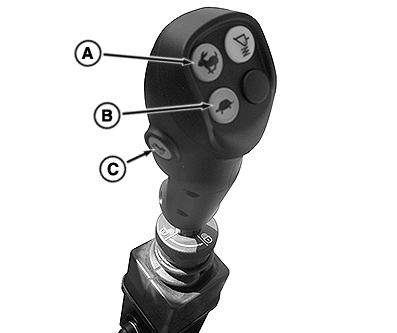
Multi-Function Lever
RXA0155611-UN-09NOV16
Mechanical Mid-SCV Control
RXA0155612-UN-09NOV16
Electro-Hydraulic Mid-SCV Control
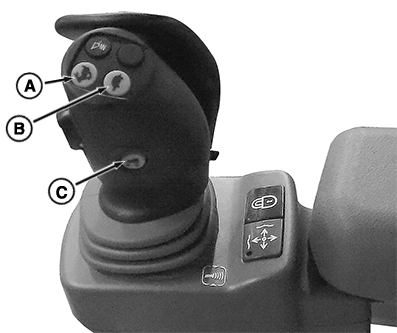
A - Manual Upshift
B - Manual Downshift
C - Joystick Reverser
On top of the loader joystick are buttons for the manual upshift (A) and downshift (B) of gears. Once a range and direction have been selected, buttons work as follows:
- Press the button once for a single gear change to be executed, either increase or decrease.
- Press and hold the button for quick acceleration through the gears.
On the side of the loader joystick is a button for the joystick reverser (C). Once a direction has been selected, the button works as follows:
- Press the button when machine is in motion to reverse the direction of travel. No clutch or left-hand reverser usage is required.
Clutch and Brakes
RXA0154072-UN-23SEP16
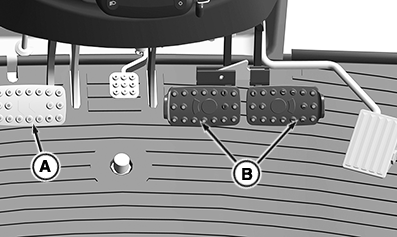
A - Clutch Pedal
B - Brake Pedals
The clutch pedal (A) is not required for any reason to operate the transmission. The pedal functions and is available if the operator prefers to use it.
The brake pedals (B) function as service brakes, but also have an AutoClutch™ feature, which disengages the clutch during braking. See “AutoClutch™” in this section for more information.
Creeper Shift Lever
RXA0155921-UN-22NOV16
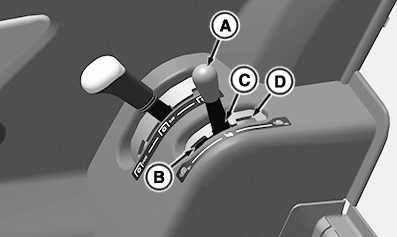
A - Creeper Shift Lever
B - Creeper High Range
C - Creeper Disengaged
D - Creeper Low Range
The creeper is a set of low gears which allow operations below 2.50 km/h (1.55 mph). To find the best gear for your application, see “16/16 Creeper Ground Speed Chart” or “32/16 Creeper Ground Speed Chart” in this section.
To engage the creeper:
-
Move machine to a level location.
-
Depress clutch pedal.
-
Make sure that machine is not moving or rolling.
-
Move creeper shift lever (A) to the left out of the detent position.
-
Move lever forward for creeper High range (B) or rearward for creeper Low range (D).
-
Creeper indicator illuminates on primary display. See “Transmission Indicators” in this section.
-
Creeper is operated with the shift lever and left-hand reverser similar to normal transmission function.
-
To disengage, repeat procedure and place lever in the creeper disengaged position (C).
|
DP51502,0002860-19-20161222 |