Rear Wheel Ballast
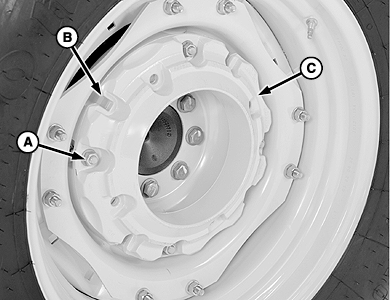
LV9684-UN-17AUG04
Single Wheel Weight Shown
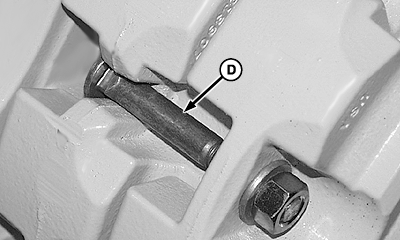
LV9692-UN-19AUG04
Install Bolt in Slot (Additional Weight)
A - Nut, 5/8-11 (4 used)
B - Slot (four locations)
C - Wheel Weight
D - Round Head Bolt (4 used)
 CAUTION: When installing weights, use appropriate lifting equipment
or have the job performed by your John Deere Dealer.
CAUTION: When installing weights, use appropriate lifting equipment
or have the job performed by your John Deere Dealer.
-
Remove wheel.
-
Attach weight (C) to wheel disks using four special round head bolts, washers, and nuts (A). Tighten nuts to specifications.
Item Measurement Specification Wheel Weight-to-Disk Nuts Torque 215 N·m (159 lb·ft) -
Install additional weights:
-
Insert four round head bolts (D) through slots (B) of first weight. Install bolts with the square neck in slot (as shown).
-
Align mounting holes of second weight with the round headed bolts and install weight. Fasten with washers and nuts. Tighten nuts to specifications.
Item Measurement Specification Wheel Weight-to-Weight Nuts Torque 215 N·m (159 lb·ft)
-
-
Install wheel and tighten mounting hardware. See "Wheel and Tire Maintenance” section.
-
Retighten bolts after 3 hours, 10 hours, and every 250 hours of operation thereafter.
|
DP51502,0002876-19-20161222 |