Removing Battery
PY13177-UN-20OCT12
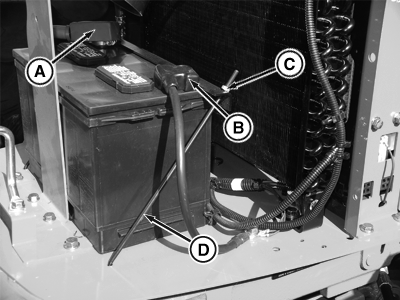
A - Positive (+) Cable Nut
B - Negative (-) Cable Nut
C - Nuts
D - Battery Hold-Down
 CAUTION: To avoid sparks, disconnect negative (ground) cable
first and connect it last.
CAUTION: To avoid sparks, disconnect negative (ground) cable
first and connect it last.
-
Remove nut retaining negative (ground) battery cable (B) and remove the cable connection. Then remove positive cable nut (A) and connection.
-
Loosen nuts (C) securing battery hold-down (D) and rotate the holder down freeing the battery.
-
Lift and slide the battery from the battery tray.
|
PG57337,00001F0-19-20121020 |