OOS and Low Profile Seats
Premium Seat
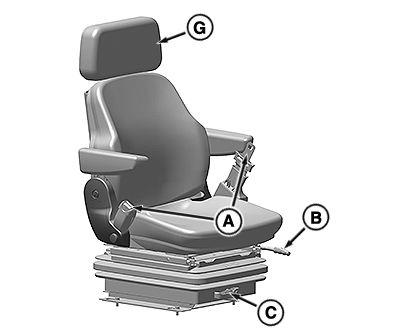
RXA0158473-UN-04APR17
Front View
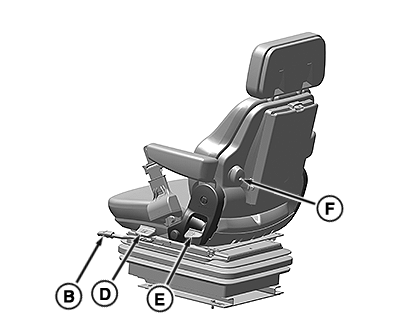
RXA0158474-UN-04APR17
Rear View
A - Seat Belt
B - Forward/Backward Adjustment Lever
C - Weight Adjustment Lever
D - Swivel Handle
E - Backrest Adjustment Handle
F - Lumbar Support Adjustment Knob
G - Back Rest Extension
 CAUTION: To avoid accidents, adjust the seat before driving.
NOTE: While adjusting seat, make sure that all controls can be easily accessed.
Adjust the following to operator preference:
Seat Belt
-
Pull tab end of the seat belt (A) to extend.
-
Push tab into latch end until an audible click is heard.
-
Tug on the seat belt to ensure that it is latched.
-
Upon exiting, depress the button on latch to release.
Forward/Backward Adjustment
-
Lift forward/backward adjustment lever (B).
-
Slide seat to desired position.
-
Release forward/backward lever (B) to lock seat in position.
Weight Adjustment
-
Flip out weight adjustment lever (C).
-
Turn lever clockwise (increase load) or counterclockwise (decrease load) to reach desired suspension travel for operator weight.
IMPORTANT: Stop turning weight adjustment lever (C) counterclockwise (decreasing load) when seat reaches minimum weight position and lever resistance increases. Seat mechanism could be damaged.
NOTE: Suspension should not bottom out when properly adjusted.
-
Return weight adjustment lever (C) to lock seat in position.
Swivel Adjustment
-
Lift on swivel handle (D).
-
Rotate seat left or right to the desired position.
-
Push swivel handle down to lock in position.
Backrest Adjustment
-
Lift on backrest adjustment handle (E).
-
Rotate seat to desired position. The seat turns 15° to the left and right. The seat locks at 7.5° intervals.
-
Release handle to lock backrest into the position.
Lumbar Support
Turn lumbar support adjustment knob (F) clockwise or counterclockwise until desired lumbar support is reached.
Back Rest Extension
Back rest extension (G) is available for extended back rest support.
Standard Seat
NOTE: Adjust with the operator in the seat for best results
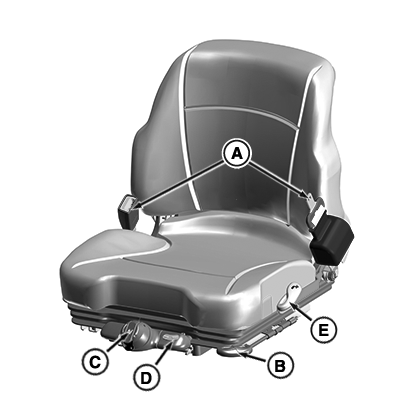
RXA0161428-UN-14DEC17
A - Seat Belt
B - Forward/Backward Adjustment Lever
C - Weight Adjustment Lever
D - Weight Indicator
E - Backrest Adjustment Handle
Seat Belt
-
Pull tab end of the seat belt (A) to extend.
-
Push tab into latch end until an audible click is heard.
-
Tug on the seat belt to ensure that it is latched.
-
Upon exiting, depress the button on the latch to release.
Forward/Backward Adjustment
-
Lift forward/backward adjustment lever (B).
-
Slide seat to desired position.
-
Release forward/backward lever (B) to lock seat in position.
Weight Adjustment
-
Flip out weight adjustment lever (C).
-
Turn lever clockwise (increase load) or counterclockwise (decrease load) to reach desired suspension travel for operator’s weight.
IMPORTANT: Stop turning weight adjustment lever (C) counterclockwise (decreasing load) when seat reaches minimum weight position and lever resistance increases. Seat mechanism could be damaged.
NOTE: Suspension should not bottom out when properly adjusted.
-
Return weight adjustment lever (C) to lock seat in position.
Weight Indicator
Weight indicator (D) shows operator’s weight when seated. The weight range is 40—140 kg (88—309 lb).
Backrest Adjustment
-
Lift on the backrest adjustment handle (E).
-
Rotate seat to desired position.
-
Release handle to lock backrest into the position.
|
GS25068,0005AD1-19-20181010 |