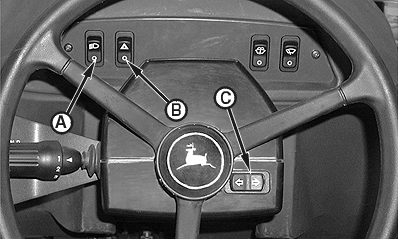
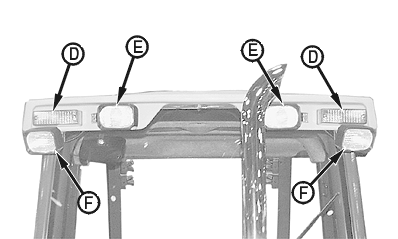
LightsPush the work and drive lights switch (A) to operate work and drive lights (E), tail lights, and front work lights (F), if equipped. The work and drive lights switch has three positions:
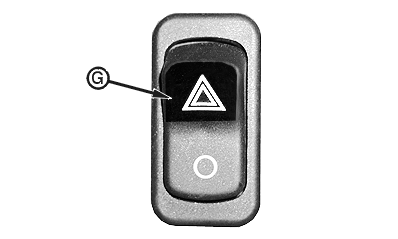
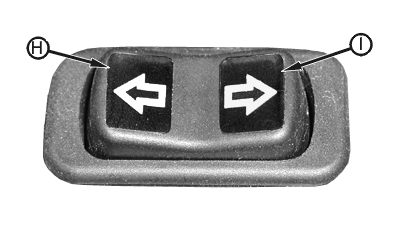
Push upper half of warning lights switch (B) to turn amber turn signal or warning lights (D) at front and rear of cab ON. When warning lights switch is ON, warning lights indicator (G), left turn indicator (H), and right turn indicator (I) will flash. Push lower half of warning lights switch to turn amber turn signal or warning lights at front and rear of cab OFF. Push the turn signal switch (C) to signal turning direction. The turn signal switch has three positions:
Front amber turn signals or warning lights flash individually to signal direction of turn when left or right half of turn signal switch is pushed. Front amber turn signals or warning lights flash together when upper half of warning lights switch is pushed.
|
Optional Chrome Exhaust Stack Shown
|
CED,OUO1079,362 -19-13JUN00-1/2 |
|
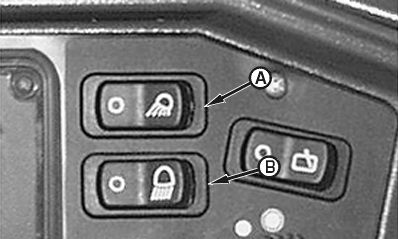
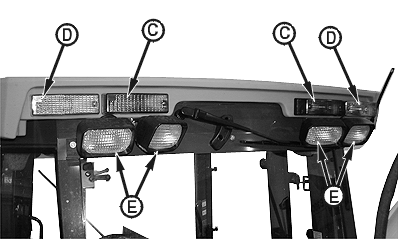
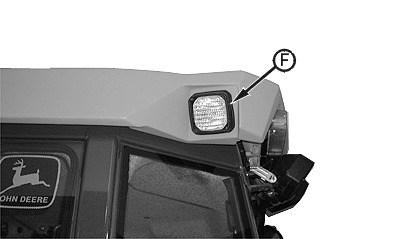
Push right half of rear work lights switch (A) to turn rear work lights (E) ON. Push left half of rear work lights switch to turn rear work lights OFF. Push right half of side docking lights switch (B), if equipped, to turn side docking lights (F), if equipped, ON. Push left half of side docking lights switch to turn side docking lights OFF. Rear red tail and brake lights (C) illuminate when work and drive lights switch is ON and/or when service brakes are applied. Rear amber turn signals or warning lights (D) flash individually to signal direction of turn when left or right half of turn signal switch is pushed. Rear amber turn signals or warning lights flash together when upper half of warning lights switch is pushed.
|
|
CED,OUO1079,362 -19-13JUN00-2/2 |