Monitor and Gauge Panel
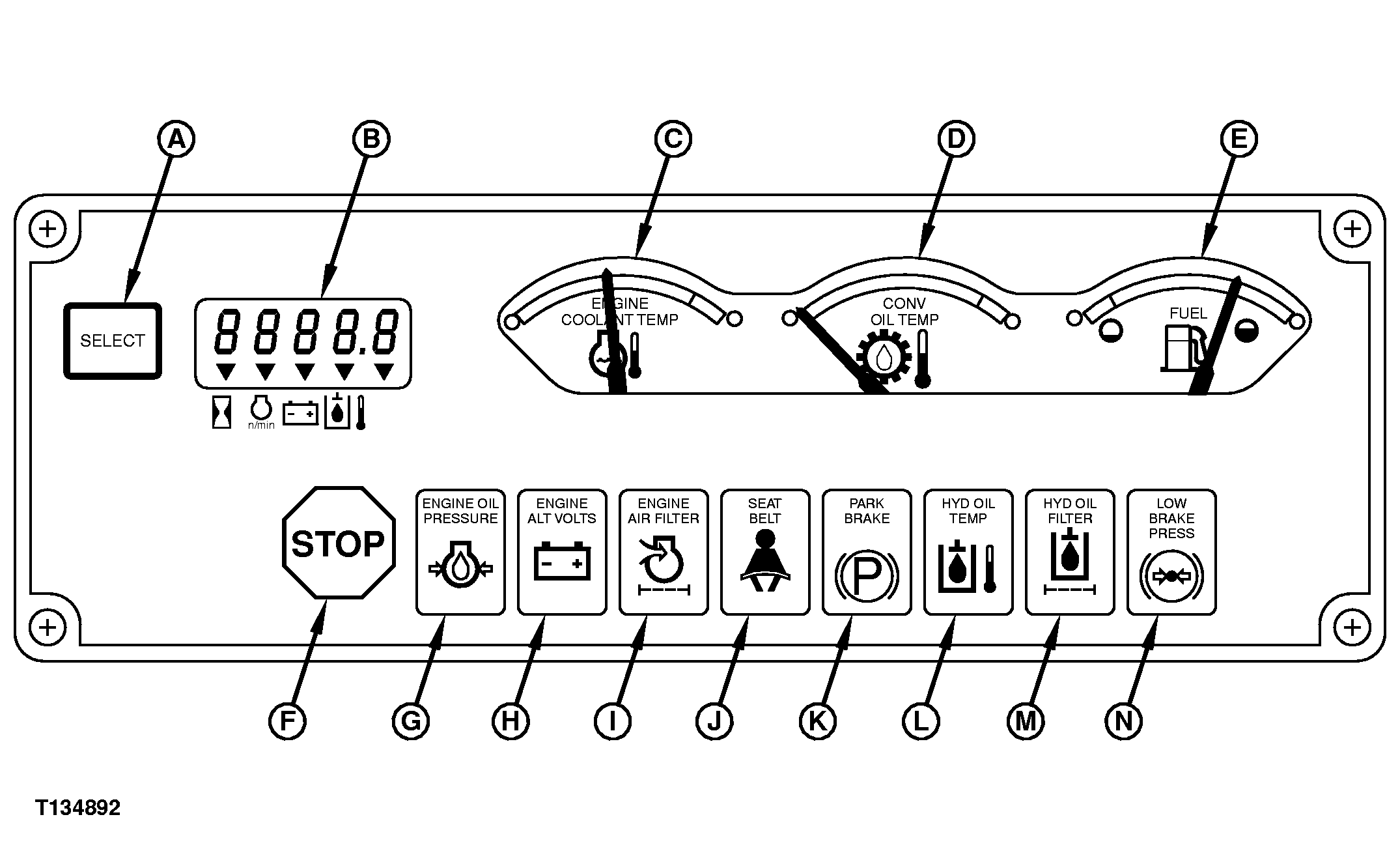
T134892


A-Select Button
B-Display Window
C-Engine Coolant Temperature Gauge
D-Transmission and Torque Converter Oil Temperature Gauge


E-Fuel Level Gauge
F-STOP Indicator
G-Engine Oil Pressure Indicator
H-Alternator Voltage Indicator


I-Engine Air Filter Restriction Indicator
J-Seat Belt Indicator
K-Park Brake Indicator
L-Hydraulic Oil High Temperature Indicator


M-Hydraulic Oil Filter Restriction Indicator
N-Not Used

The monitor panel has a select button (A) and display window (B), three gauges (C-E), a STOP indicator (F), and seven function indicators (G-M). See the remainder of this chapter for more information on gauges and indicators.

Display Monitor Modes of Operation

The display monitor has three modes of operation:

    IMPORTANT: Prevent possible machine damage. Do not operate machine when

    monitor is inoperable, malfunctioning, or does not successfully complete self test.

  • BULB CHECK MODE: With the engine not running, turning the key switch to ON puts the display monitor in bulb check mode. In this mode, the monitor alarm beeps, all gauges and indicators light, and all gauge needles cycle from minimum to 12-o'clock positions before registering current readings. Bulb check mode lasts five seconds, to allow the operator time to verify that all display elements are functional.

OUO1079,00002C4 -19-25OCT00-1/2


  • KEY SWITCH ON, ENGINE NOT RUNNING MODE: With key switch ON but the engine not running, all gauges (C-E), the engine oil pressure indicator (G), and the alternator voltage indicator (H) remain lit. Press and hold the select button to cycle the display window between three displays.
  • ENGINE RUNNING MODE: Monitor panel enters engine running mode after bulb check mode when the engine is started. In engine running mode, current status of machine is displayed on the display window, gauges, and indicators. Press and hold the select button to cycle the display window between three displays.
    Display Window Displays

    The display window has four displays. Press and hold the select button to cycle between displays on the display window when the monitor panel is active:

    • Hour Meter
    • Engine rpm
    • Battery Voltage
    • Hydraulic Oil Temperature

OUO1079,00002C4 -19-25OCT00-2/2