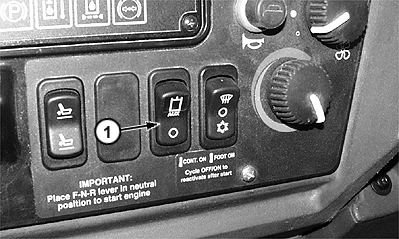
Selective Flow Valve Adjustment1. Press selective flow switch (1) to the OFF position. |
|
TX03768,0000B29 -19-13OCT00-1/4 |
|
2.
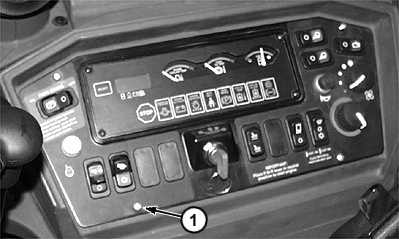
Remove four cap screws (1) from side console and lay console aside.
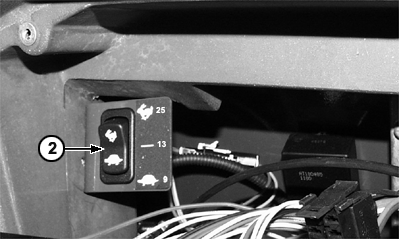
NOTE: The valve selective oil flow setting is pre-set at 25 gpm at the factory. 3. Press gpm selective flow switch (2) to the "25" gpm (rabbit) setting if desired gpm flow needed varies between 14-34 gpm. For lower gpm flow below 14 gpm, push switch to either "9" or "13" gpm (turtle) |
|
TX03768,0000B29 -19-13OCT00-2/4 |
|
Attach side console back on the machine. Start the machine. Push selective flow switch (1) fully forward (third position); at this position the oil flow through the valve and to the working attachment is continuous. |
|
TX03768,0000B29 -19-13OCT00-3/4 |
|
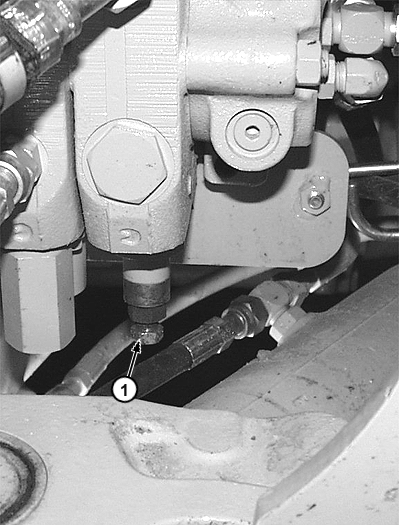
IMPORTANT: Avoid tool damage when adjusting the selective flow valve when turning the selective flow valve adjuster screw. To set the oil flow range from 14-34 gpm using the selective flow adjustor screw, a flow meter MUST be used. 4. To adjust flow between 14 and 34 gpm (rabbit), go to the backhoe valve assembly and loosen lock nut on the selective flow valve. Turn adjustment screw (1) in or out for desired flow. Tighten lock nut. |
|
TX03768,0000B29 -19-13OCT00-4/4 |