Steering Column Lever
-
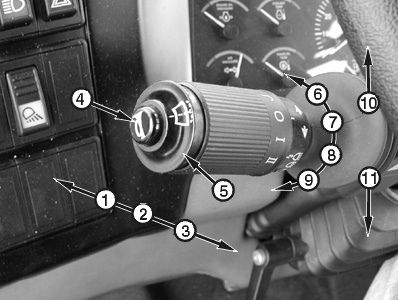
T143150B-UN-20JUN011 - High Beam HeadLight Position
2 - Low Beam HeadLight Position
3 - Flash-to-Pass Headlight Position
4 - Horn Button
5 - Windshield Washer Button
6 - Intermittent Windshield Wiper Position
7 - Windshield Wiper Off Position
8 - Low Speed Windshield Wiper Position
9 - High Speed Windshield Wiper Position
10 - Right Turn Indicator Position
11 - Left Turn Indicator Position
High Beam Headlight: Push lever forward to high beam headlight position (1). -
Low Beam Headlight: Move lever to center dim headlight position (2).
-
Flash-to-Pass Headlight: Pull lever rearward to flash-to-pass headlight position (3). Lever will return to dim headlight position when released.
-
Horn Button: Push to sound horn.
-
Windshield Washer Button: With key switch in ON or ACCESSORY position, push to activate windshield washer.
-
Intermittent Windshield Wiper: With key switch in ON or ACCESSORY position, turn steering column lever forward to intermittent wiper position (6). Intermittent wiper time interval can be adjusted using the monitor display unit (MDU).
-
Windshield Wiper Off: Turn steering column lever forward or rearward, as necessary, to windshield wiper OFF position (7) to turn wiper OFF.
-
Low Speed Windshield Wiper: With key switch in ON or ACCESSORY position, turn steering column lever rearward to low speed windshield wiper position (8) to activate low speed windshield wiper.
-
High Speed Windshield Wiper: With key switch in ON or ACCESSORY position, turn steering column lever rearward to high speed windshield wiper position (9) to activate high speed windshield wiper.
-
Right Turn Indicator: Lift steering column lever up to right turn indicator position (10) to activate right turn indicator.
-
Left Turn Indicator: Push steering column lever down to left turn indicator position (11) to activate left turn indicator.
|
OUO1043,0000DB4-19-20010620 |