Monitor Display Unit—Menu Function
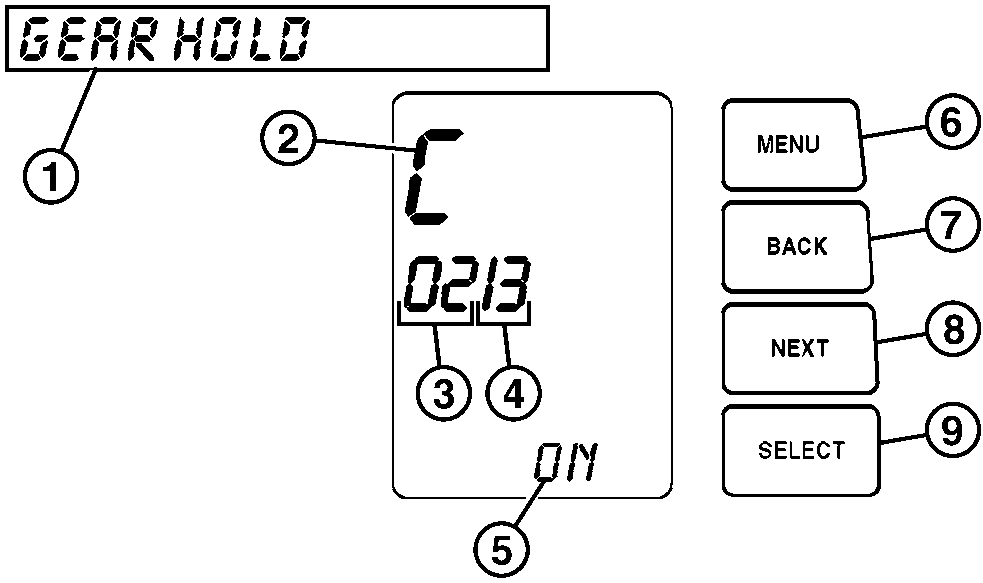
T144178-UN-24JUL01
1 - Message Display
2 - Menu Display
3 - Sub Menu Display
4 - Sub Sub Menu Display
5 - Information Display
6 - MENU Button
7 - BACK Button
8 - NEXT Button
9 - SELECT Button
- Message Display: Shows description of current menu screen selected.
- Menu Display: Shows which menu is currently selected.
- Sub Menu Display: Shows which sub menu is currently selected.
- Sub Sub Menu Display: Shows which sub sub menu is currently selected.
- Information Display: Information displayed varies, depending on which menu screen is currently selected.
-
MENU Button: Push to advance through
5 menus (A, B, C, D, and E) and the default menu.
Push MENU at any time while navigating through a menu to return to default data display.
- BACK Button: Push to return to the next higher menu. For example, if navigating in the A 01 sub menu level, pressing BACK will return the MDU data display to the A menu of the top menu level.
- NEXT Button: Push to advance from one menu to the next in the same sub menu level or sub sub menu level. For example, if navigating in the A 01 sub level, push NEXT button once to go to the A 02 menu.
- SELECT Button: Push to access the menu below the currently shown menu. For example, if sub level menu A 01 is currently displayed, press SELECT to display the A 011 sub sub level.
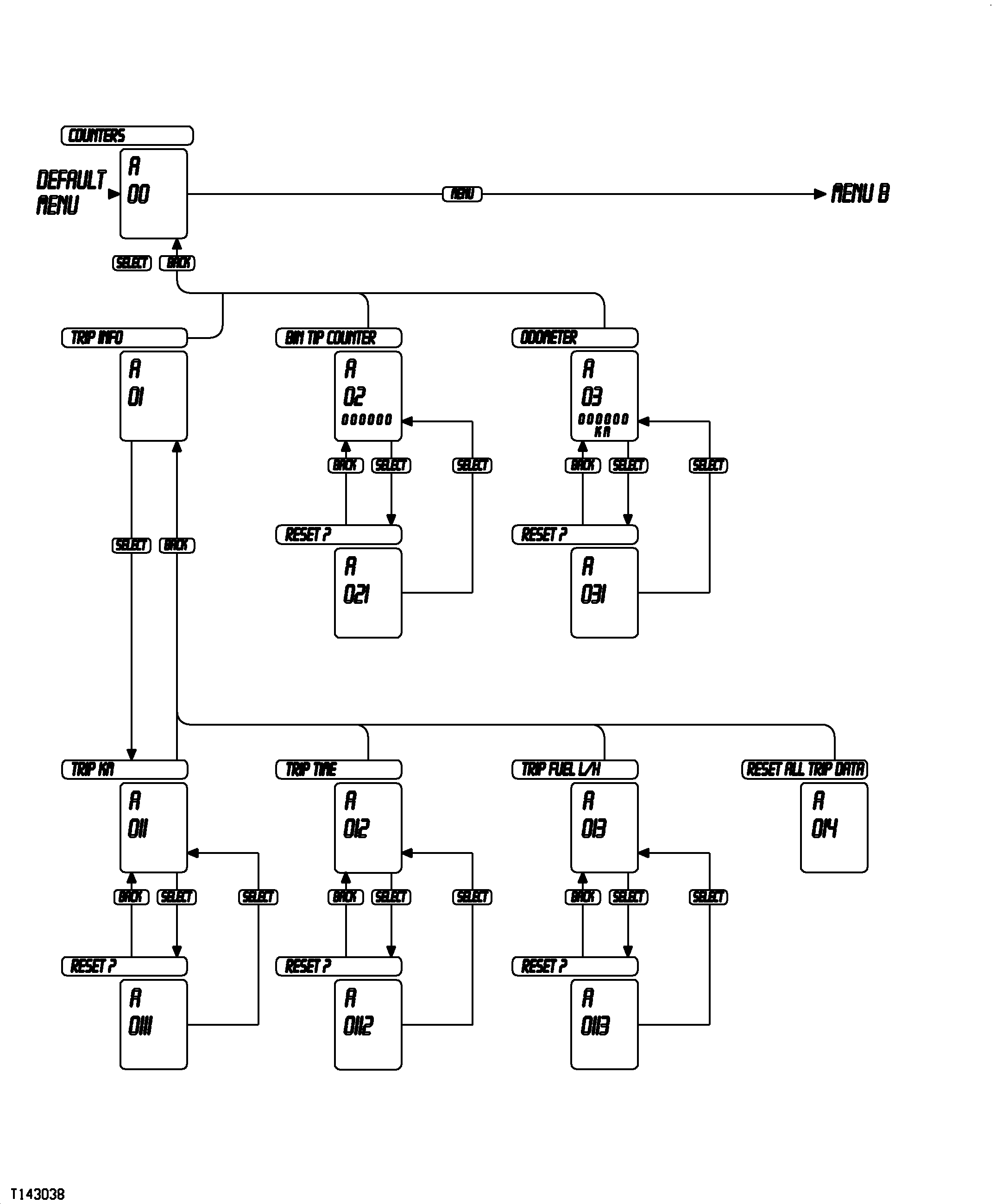
T143038-UN-11OCT01
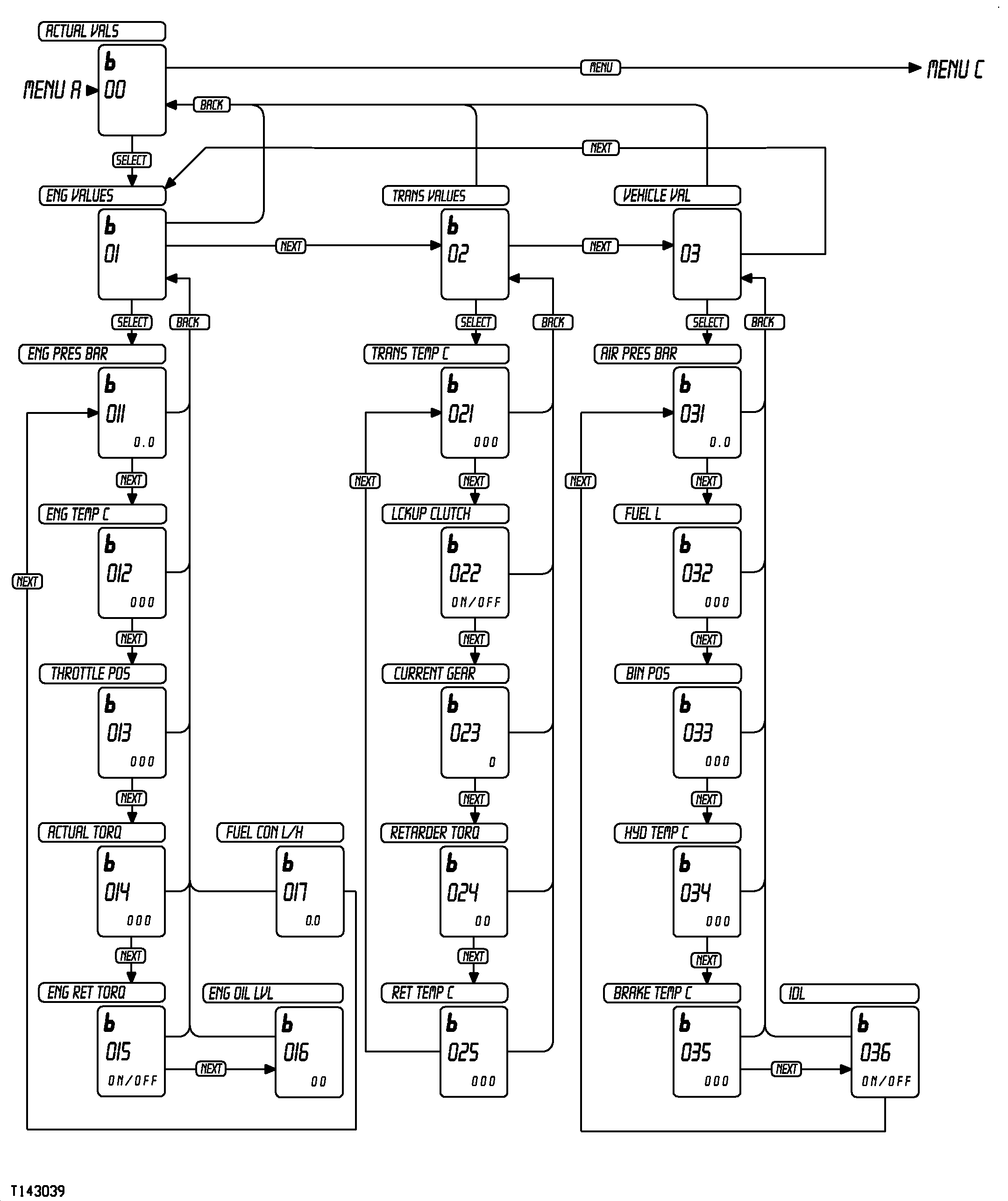
T143039-UN-22OCT01
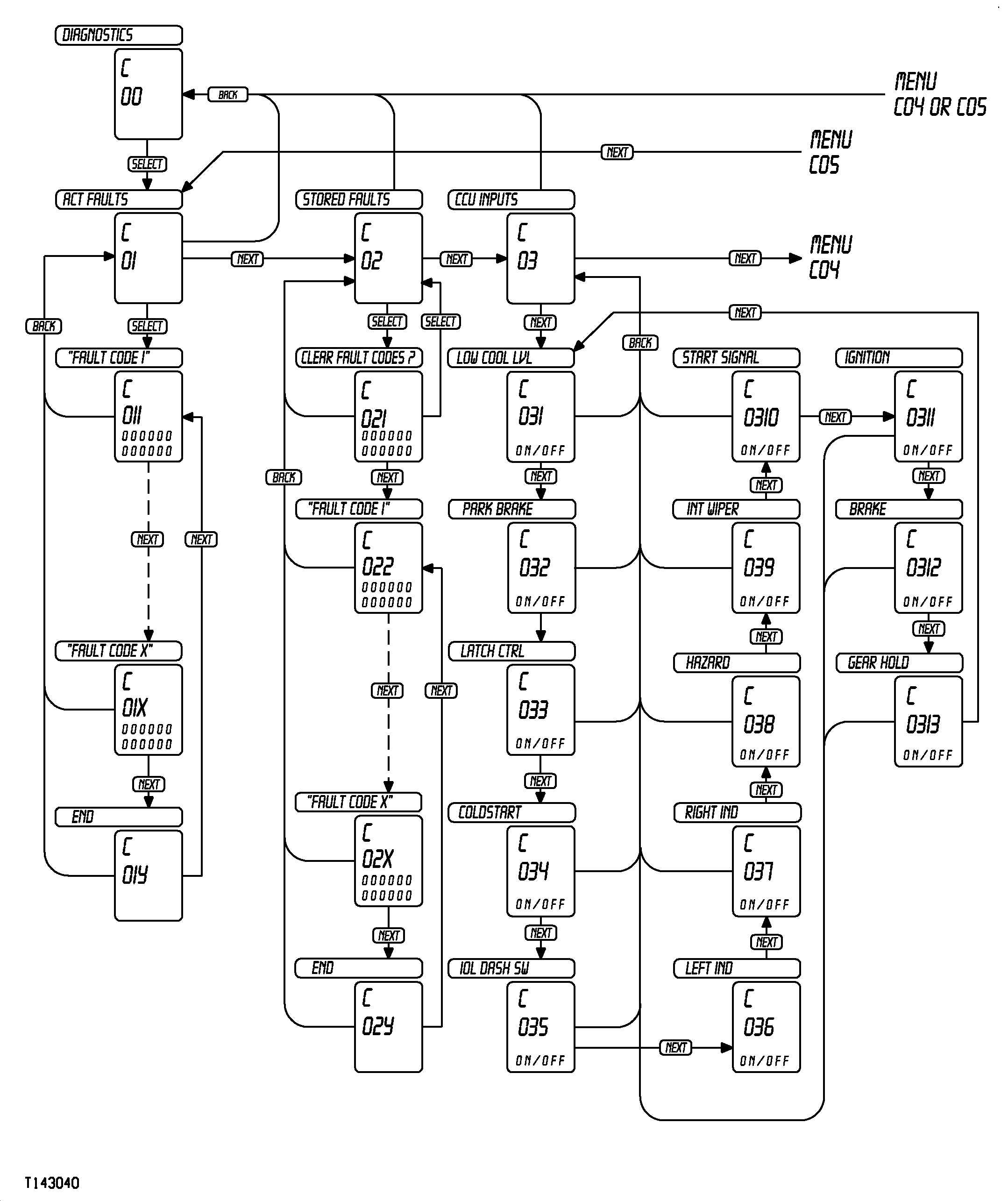
T143040-UN-11OCT01
T143744-UN-11OCT01
T143041-UN-22OCT01
T143042-UN-11OCT01
|
Menu Functions |
|||||
|---|---|---|---|---|---|
|
Menu |
Description |
||||
|
A 00 |
Counters |
Menu displays counter information and allows counters to be reset. |
|||
|
A 01 |
Trip Information |
Menu displays trip counter information since counters were last reset. |
|||
|
A 011 |
Trip Distance |
Data display shows distance machine traveled, in kilometers or miles, since trip distance counter was last reset. |
|||
|
A 0111 |
Reset |
Press SELECT for longer than 3 beeps to reset trip distance counter. |
|||
|
A 012 |
Trip Time |
Data display shows machine operation time since trip time counter was last reset. |
|||
|
A 0121 |
Reset? |
Press SELECT for longer than 3 beeps to reset trip time counter. |
|||
|
A 013 |
Trip Fuel |
Data display shows machine fuel consumption rate since trip fuel counter was last reset. |
|||
|
A 0131 |
Reset? |
Press SELECT for longer than 3 beeps to reset trip fuel counter. |
|||
|
A 014 |
Reset All Trip Data? |
Press SELECT for longer than 3 beeps to reset all trip counters. |
|||
|
A 02 |
Bin Tip Counter |
Data display shows number of times dump body was tipped since bin tip counter was last reset. |
|||
|
A 021 |
Reset? |
Press SELECT for longer than 3 beeps to reset bin tip counter. |
|||
|
A 03 |
Odometer |
Odometer displays distance machine has traveled in kilometers or miles. Odometer cannot be reset. |
|||
|
B 00 |
Actual Values |
Menu displays machine sensor information. |
|||
|
B 01 |
Engine Values |
Menu displays engine sensor information. |
|||
|
B 011 |
Engine Oil Pressure |
Data display shows engine oil pressure in bar or psi. |
|||
|
B 012 |
Engine Coolant Temperature |
Data display shows engine coolant temperature in °C or °F. |
|||
|
B 013 |
Throttle Position |
Data display shows throttle position as a percentage of full throttle. |
|||
|
B 014 |
Actual Torque |
Data display shows actual engine torque as a percentage. |
|||
|
B 015 |
Engine Retarder Torque |
Data display shows engine brake as a percentage. |
|||
|
B 016 |
Engine Oil Level |
Data display shows engine oil level as a percentage of full. |
|||
|
B 017 |
Fuel Consumption |
Data display shows fuel consumption in L/h or gal/h. |
|||
|
B 02 |
Transmission Values |
Menu displays transmission sensor information. |
|||
|
B 021 |
Transmission Temperature |
Data display shows transmission temperature in °C or °F. |
|||
|
B 022 |
Lock-Up Clutch |
Data display shows ON/OFF status of lock-up clutch. |
|||
|
B 023 |
Current Gear |
Data display shows the currently activated travel gear. |
|||
|
B 024 |
Retarder Torque |
Data display shows actual transmission retarder torque as a percentage. |
|||
|
B 025 |
Retarder Oil Temperature |
Data display shows retarder oil temperature in °C or °F. |
|||
|
B 03 |
Vehicle Values |
Menu displays miscellaneous machine sensor information. |
|||
|
B 031 |
Air Pressure |
Data display shows system air pressure in bar or psi. |
|||
|
B 032 |
Fuel Level |
Data display shows fuel supply in L or gal. |
|||
|
B 033 |
Bin Position |
Data display shows body position as a percentage of body in full up position. |
|||
|
B 034 |
Hydraulic Temperature |
Data display shows hydraulic oil temperature in °C or °F. |
|||
|
B 035 |
Brake Temperature |
If machine is equipped with wet brakes, data display shows wet brake temperature in °C or °F. |
|||
|
B 036 |
Inter-Axle Lock |
Data display shows ON/OFF status of differential lock. |
|||
|
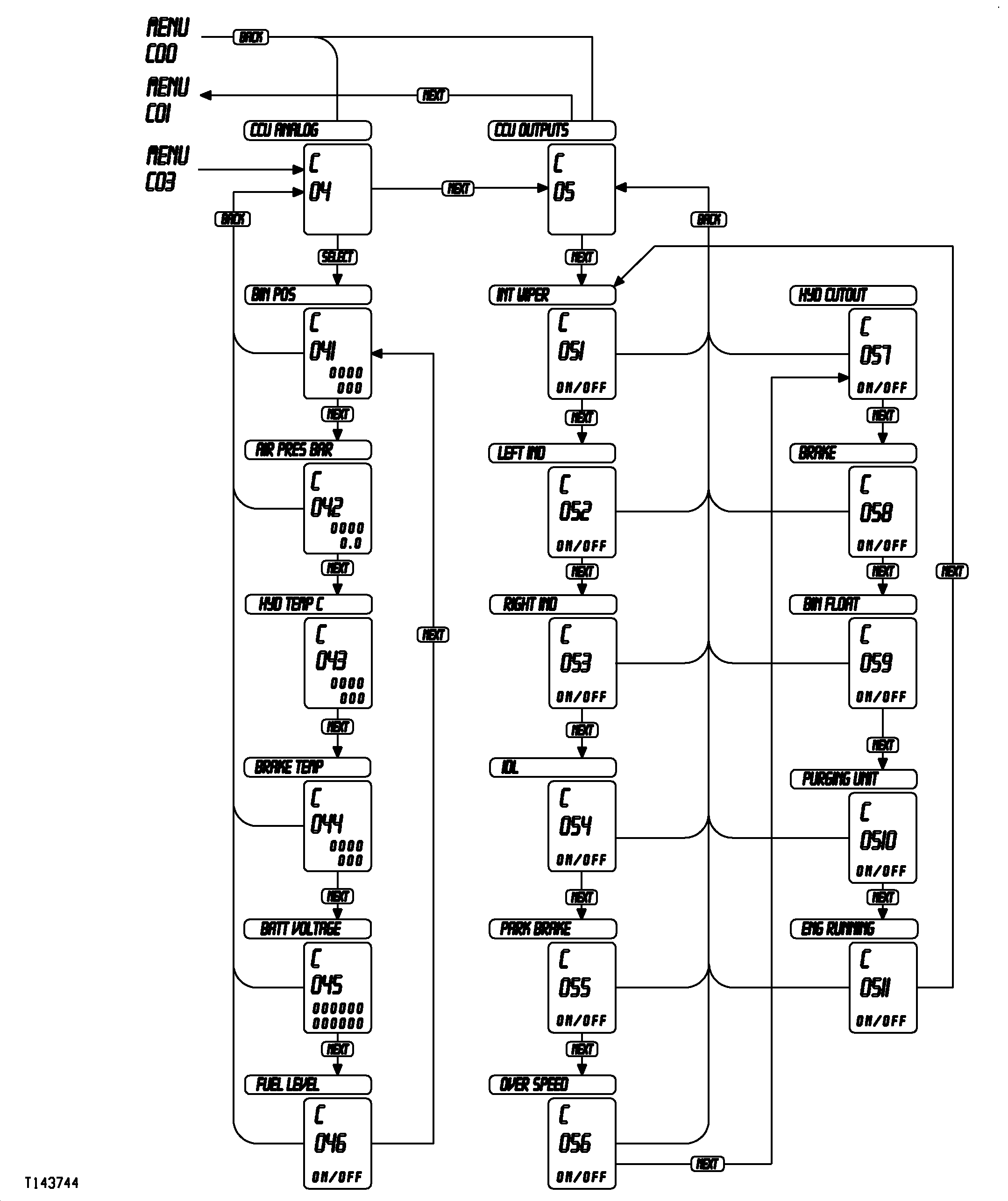
C 00 |
Diagnostics |
This menu is used to display service codes and diagnose inputs and outputs of CCU. |
|||
|
C 01 |
Actual Service Codes |
Menu displays CCU service code. If service code appears, see Service Codes in Miscellaneous—Troubleshooting section. |
|||
|
C 011 |
Service Code 1 |
Data display shows first active service code. See Service Codes in Miscellaneous—Troubleshooting section. |
|||
|
C 012 |
Service Code 2 |
Data display shows second active service code. See Service Codes in Miscellaneous—Troubleshooting section. |
|||
|
C 01X |
Service Code X |
Continue to press NEXT button to advance through all active service codes. |
|||
|
C 01Y |
End |
Continue to press NEXT button until END is displayed on message display. Press NEXT button again to return to first active service code. |
|||
|
C 02 |
Stored Service Codes |
Menu displays CCU service code. If service code appears, see Service Codes in Miscellaneous—Troubleshooting section. |
|||
|
C 021 |
Clear Service Codes? |
Press SELECT for longer than 3 beeps to reset trip time counter. |
|||
|
C 022 |
ECU/TCU/CCU Service Code |
Data display shows first stored service code. See Service Codes in Miscellaneous—Troubleshooting section. |
|||
|
C 02X |
ECU/TCU/CCU Service Code X |
Continue to press NEXT button to advance through maximum of 5 stored service codes. |
|||
|
C 02Y |
End |
Continue to press NEXT button until END is displayed on data display. Press NEXT button again to return to “CLEAR FAULT CODES?” display. |
|||
|
C 03 |
CCU Inputs |
Menu displays ON/OFF status of CCU digital inputs. |
|||
|
C 031 |
Low Coolant Level |
Data display shows ON/OFF status of low coolant level sensor. |
|||
|
C 032 |
Park Brake |
Data display shows ON/OFF status of pressure switch controlling park brake light. |
|||
|
C 033 |
Latch Control |
Data display shows ON/OFF status of park brake lever. |
|||
|
C 034 |
Coldstart |
Data display shows ON/OFF status of machine coldstart function. |
|||
|
C 035 |
Inter-Axle Lock Dash Switch |
Data display shows ON/OFF status of inter-axle lock dash switch. |
|||
|
C 036 |
Left Indicator |
Data display shows ON/OFF status of left turn indicator input from steering column switch. |
|||
|
C 037 |
Right Indicator |
Data display shows ON/OFF status of right turn indicator input from steering column switch. |
|||
|
C 038 |
Hazards |
Data display shows ON/OFF status of hazard switch. |
|||
|
C 039 |
Intermittent Wipers |
Data display shows ON/OFF status of intermittent wiper input from steering column switch. |
|||
|
C 0310 |
Start Signal |
Data display indicates if key switch is in START position. ON indicates key switch is in START position; OFF indicates key is not in start position. |
|||
|
C 0311 |
Ignition |
Data display indicates if key switch is in RUN position. ON indicates key switch is in RUN position; OFF indicates key is not in RUN position. |
|||
|
C 0312 |
Brake |
Data display indicates if brake pedal is being depressed. ON indicates brake pedal is being depressed. OFF indicates brake pedal is not being depressed. |
|||
|
C 0313 |
Gear Hold |
Data display indicates ON/OFF status of range hold rocker switch. |
|||
|
C 04 |
CCU Analog Inputs |
Menu displays CCU analog inputs in milivolts for analog sensors as measured at CCU input. |
|||
|
C 041 |
Bin Position |
Data display shows milivolts of at bin position sensor at CCU input and the associated value of bin position as a percentage of full tip value. |
|||
|
C 042 |
Air Pressure |
Data display shows milivolts of air pressure sensor as measured at CCU input and the air pressure value in bar or psi. |
|||
|
C 043 |
Hydraulic Temperature |
Data display shows milivolts of hydraulic temperature sensor as measured at CCU input and temperature value in °C or °F. |
|||
|
C 044 |
Wet Brake Temperature |
Data display shows milivolts of wet brake temperature sensor as measured at CCU input and temperature value in °C or °F. |
|||
|
C 045 |
Battery Voltage |
Data display shows both single battery voltage and 2 battery voltage in volts. |
|||
|
C 046 |
Fuel Level |
Data display shows milivolts of fuel level sensor as measured at CCU input and fuel level value in L or gal. |
|||
|
C 05 |
CCU Outputs |
Menu displays CCU analog output signal ON/OFF status. |
|||
|
C 051 |
Intermittent Wipers |
Data display shows CCU intermittent wiper output signal ON/OFF status. |
|||
|
C 052 |
Left Indicator |
Data display shows CCU left turn indicator output signal ON/OFF status. |
|||
|
C 053 |
Right Indicator |
Data display shows CCU right turn indicator output signal ON/OFF status. |
|||
|
C 054 |
Inter-Axle Lock |
Data display shows CCU inter-axle lock output signal ON/OFF status. |
|||
|
C 055 |
Park Brake |
Data display shows CCU park brake output signal ON/OFF status. |
|||
|
C 056 |
Overspeed |
Data display shows CCU overspeed output signal ON/OFF status. |
|||
|
C 057 |
Hydraulic Cutout |
Data display shows CCU hydraulic cutout output signal ON/OFF status. |
|||
|
C 058 |
Brake |
Data display shows CCU brake light output signal ON/OFF status, activated with engine brake and transmission retarder. |
|||
|
C 059 |
Bin Float |
Data display shows CCU bin float output signal ON/OFF status. |
|||
|
C 0510 |
Purging Unit |
Data display shows CCU purging unit output signal ON/OFF status. |
|||
|
C 0511 |
Engine Running |
Data display shows CCU engine run output signal ON/OFF status. |
|||
|
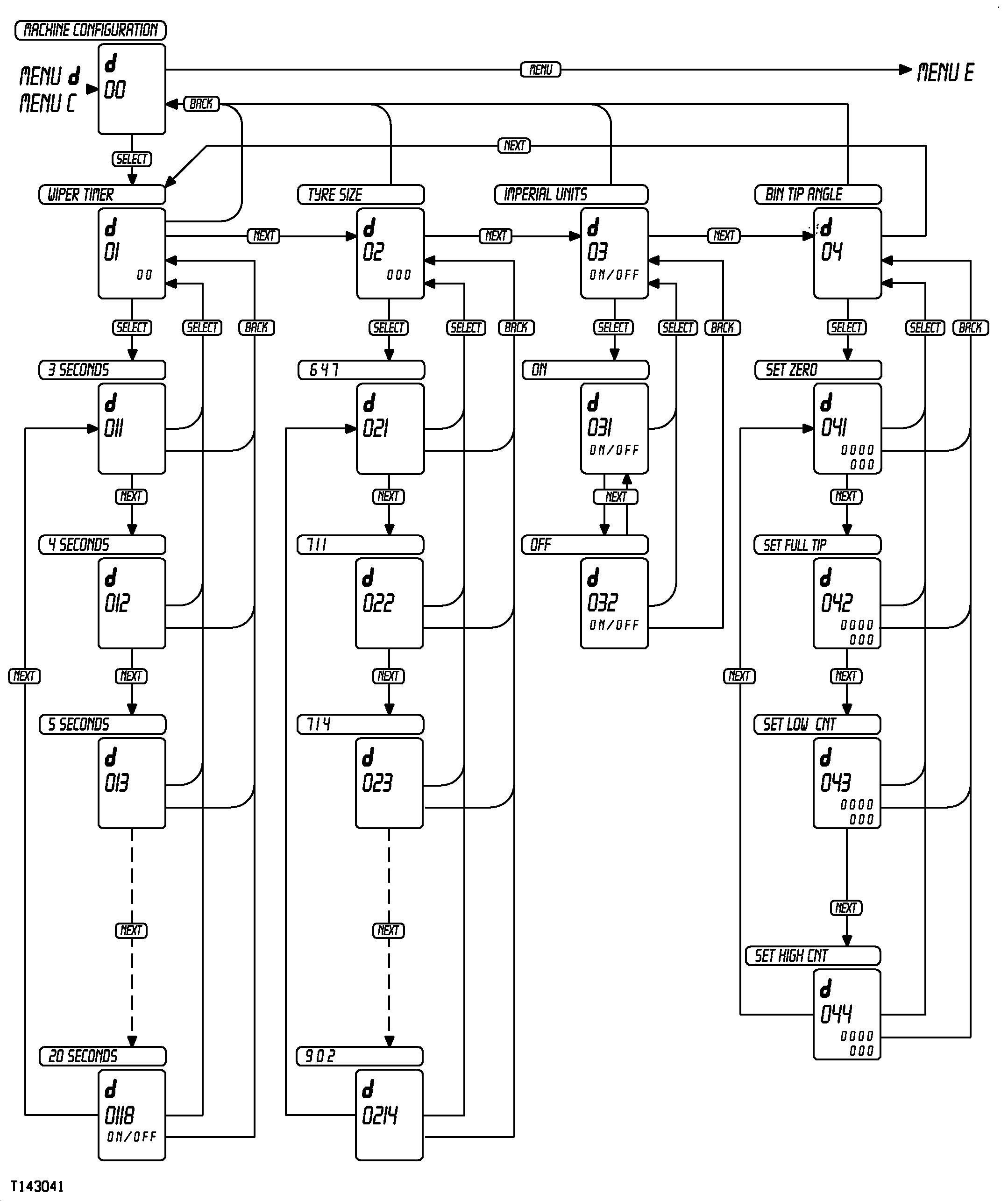
D 00 |
Machine Configuration |
Menu displays the current machine settings and allows them to be adjusted, if necessary. |
|||
|
D 01 |
Wiper Intermittent Timing |
Menu displays current setting of intermittent wipers and allows setting to be changed. |
|||
|
D 011 |
3 Seconds |
Press NEXT as necessary to advance through screens, until desired intermittent wiper time interval is displayed. When desired interval is displayed, press SELECT for longer than 3 beeps to activate that interval. |
|||
|
D 012 |
4 seconds |
Press NEXT as necessary to advance through screens, until desired intermittent wiper time interval is displayed. When desired interval is displayed, press SELECT for longer than 3 beeps to activate that interval. |
|||
|
D 01XX |
XX Seconds |
Press NEXT as necessary to advance through screens, until desired intermittent wiper time interval is displayed. When desired interval is displayed, press SELECT for longer than 3 beeps to activate that interval. |
|||
|
D 0120 |
20 Seconds |
Press NEXT as necessary to advance through screens, until desired intermittent wiper time interval is displayed. When desired interval is displayed, press SELECT for longer than 3 beeps to activate that interval. |
|||
|
D 02 |
Tire Size |
Menu allows tire size to be selected to reflect tire size installed on machine. NOTE: Value shown in data display is dynamic rolling radius of tire in mm. |
|||
|
D 021 |
647 |
Press NEXT as necessary to advance through screens, until machine tire size is displayed. When tire size is displayed, press SELECT for longer than 12 beeps to select that interval. |
|||
|
D 022 |
714 |
Press NEXT as necessary to advance through screens, until machine tire size is displayed. When tire size is displayed, press SELECT for longer than 12 beeps to select that interval. |
|||
|
D 023 |
734 |
Press NEXT as necessary to advance through screens, until machine tire size is displayed. When tire size is displayed, press SELECT for longer than 12 beeps to select that interval. |
|||
|
D 02XX |
XXX |
Press NEXT as necessary to advance through screens, until machine tire size is displayed. When tire size is displayed, press SELECT for longer than 12 beeps to select that interval. |
|||
|
D 0217 |
YYY |
Press NEXT as necessary to advance through screens, until machine tire size is displayed. When tire size is displayed, press SELECT for longer than 12 beeps to select that interval. |
|||
|
D 03 |
Imperial/English Units |
Menu allows operator to determine whether measurements will be displayed in Imperial/English units or metric units. |
|||
|
D 031 |
ON |
Press SELECT for 3 beeps to display Imperial/English units. |
|||
|
D 032 |
OFF |
Press SELECT for 3 beeps to display metric units. |
|||
|
D 04 |
Bin Tip Angle |
Menu allows operator to set bin full down and bin full up positions. Also allows operator to determine bin tip counter parameters. |
|||
|
D 041 |
Set Zero |
With machine body in the full down position, press SELECT for longer than 3 beeps to set the zero position. Display will change to show 0%. |
|||
|
D 042 |
Set Full Tip |
With machine body in the full up position, press SELECT for longer than 3 beeps to set the zero position. Display will change to show 100%. |
|||
|
D 043 |
Set Low Bin Counter Trigger |
Before setting low bin count trigger, set zero and full tip values. Low bin counter trigger default is body raised 10%. To set low bin counter trigger, raise body to desired low bin counter trigger height. Data display will show current bin height percentage. Press SELECT for 12 beeps to set low bin counter trigger. |
|||
|
D 04 |
Set High Bin Counter Trigger |
Before setting high bin count trigger, set zero and full tip values. High bin counter trigger default is body raised 70%. To set high bin counter trigger, raise body to desired high bin counter trigger height. Data display will show current bin height percentage. Press SELECT for 12 beeps to set high bin counter trigger. |
|||
|
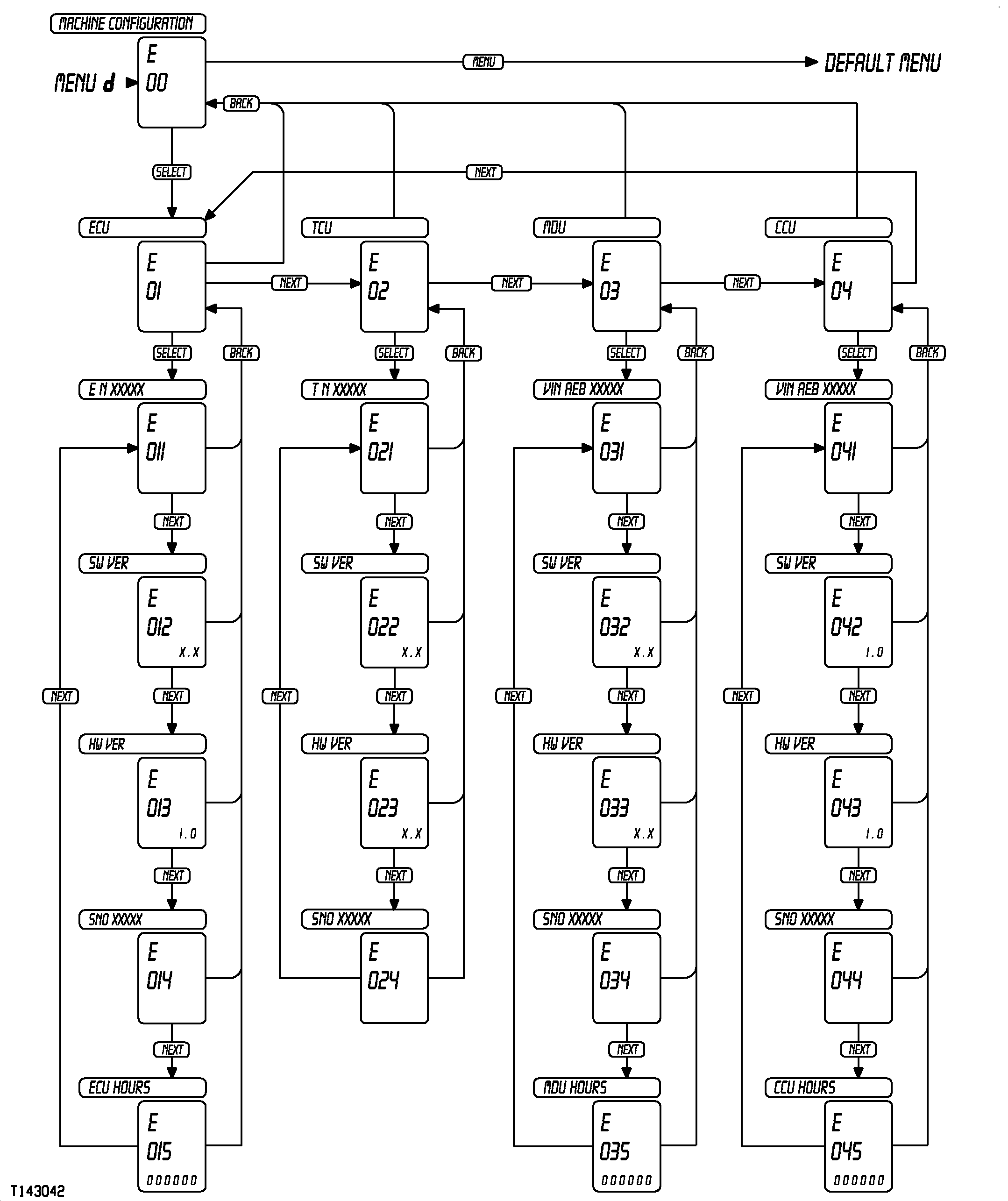
E 00 |
Machine Identification |
Menu displays machine identification information. |
|||
|
E 01 |
ECU |
Menu displays engine control unit (ECU) identification information. |
|||
|
E 011 |
EN XXXXXX |
Message display shows ECU part number. |
|||
|
E 012 |
Software Version |
Data display shows current ECU software version. |
|||
|
E 013 |
Hardware Version |
Data display shows current ECU hardware version. |
|||
|
E 014 |
Serial Number |
Message display shows ECU serial number. |
|||
|
E 015 |
Engine Hours |
Data display shows engine hours logged on current ECU. |
|||
|
E 02 |
TCU |
Menu displays transmission control unit (TCU) identification information. |
|||
|
E 021 |
TN XXXXXX |
Message display shows TCU part number. |
|||
|
E 022 |
Software Version |
Data display shows current TCU software version. |
|||
|
E 023 |
Hardware Version |
Data display shows current TCU hardware version. |
|||
|
E 024 |
Serial Number |
Message display shows TCU serial number. |
|||
|
E 03 |
MDU |
Menu displays monitor display unit (MDU) identification information. |
|||
|
E 031 |
VIN AEB XXXXX |
Message display shows the vehicle identification number of the machine. |
|||
|
E 032 |
Software Version |
Data display shows current MDU software version information. |
|||
|
E 033 |
Hardware Version |
Data display shows current MDU hardware version. |
|||
|
E 034 |
Serial Number |
Data display shows MDU serial number. |
|||
|
E 035 |
Engine Hours |
Data display shows MDU hours on current MDU. |
|||
|
E 04 |
CCU |
Menu displays chassis control unit (CCU) identification information. |
|||
|
E 041 |
VIN AEB XXXXXX |
Message display shows the vehicle identification number of the machine. |
|||
|
E 042 |
Software Version |
Data display shows current CCU software version information. |
|||
|
E 043 |
Hardware Version |
Data display shows current CCU hardware version. |
|||
|
E 044 |
Serial Number |
Message display shows CCU serial number. |
|||
|
E 045 |
Engine Hours |
Data display shows CCU hours on current CCU. |
|||
|
OUO1043,0000DB5-19-20010621 |