Inspect and Clean Cooling Systems
Inspect Cooling Systems
-
T147907B-UN-15NOV01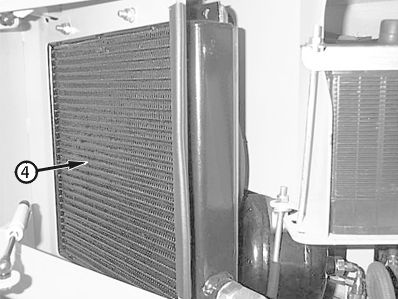
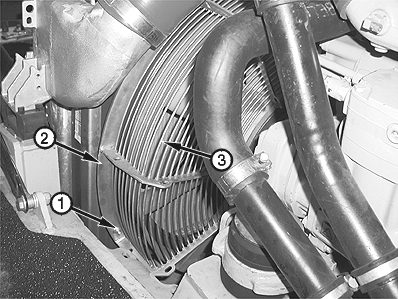
T148541C-UN-28NOV011 - Lock Nut (6 used)
2 - Fan Guard
3 - Rear Face of Cooling System
4 - Outer Face of Transmission Cooler
Inspect components of cooling system for damage. -
Inspect hoses and clamps for damage and tightness.
-
Inspect mountings and hardware for damage and tightness.
-
Inspect fins for damage and cleanliness. Ensure that there is no restriction to air flow. Clean cooling systems, if necessary.
Clean Cooling Systems
-
Turn battery disconnect switch OFF.
-
Remove cap screws, lock nuts (1) and fan guard (2).
-
IMPORTANT: Use a pressure washer and a mild detergent that is not caustic to aluminum when cleaning cooling systems.
Do not spray cooling system fins at an angle. Fins may bend.
Raise hood and wash front cooling system, spraying from rear face (3) to front face. Keep cooling system free of debris and obstructions which may restrict air flow.
-
Install fan guard, cap screws and lock nuts.
-
Open battery compartment door.
-
Spray outer face of transmission cooler (4). Keep cooling system free of debris and obstructions which may restrict air flow.
-
Turn battery disconnect switch ON and close hood and battery compartment door.
|
OUO1043,0000E05-19-20011030 |