Check Batteries, Clean and Tighten Terminals
T148322B-UN-26NOV01
T148323B-UN-26NOV01
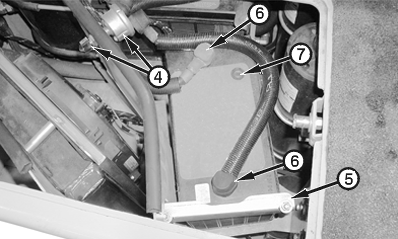
Outer Battery
T148324B-UN-26NOV01
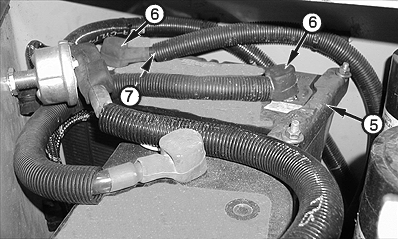
Inner Battery
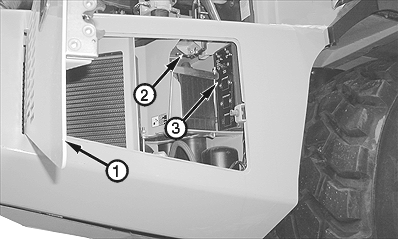
1 - Battery Compartment Door
2 - Top Access Door Latch
3 - Circuit Breaker Box
4 - Battery Disconnect Switch
5 - Mounting Bracket Assembly (2 used)
6 - Terminal (4 used)
7 - Battery Charge Indicator (2 used)
-
Open hood. Open battery compartment door (1).
-
Push top access door latch (2) inward and open top access door.
-
Clean debris from battery compartment.
-
Inspect circuit breaker box (3) and battery disconnect switch (4) for damage and secure installation. Tighten mounting hardware, if necessary. Replace damaged components. (See your authorized dealer.)
-
Inspect batteries and cables for damage. Replace, if necessary. (See Replace Batteries in Miscellaneous—Maintenance section for battery replacement.)
-
Inspect and clean terminals (6). Ensure that posts are secure in battery housings. Ensure that cables are securely installed on posts.
-
Ensure that mounting bracket assemblies (5) are secure. Tighten nuts, if necessary.
-
Check battery charge indicator (7) on each battery. The colors displayed are as follows:
- Green—Battery is fully charged.
- Black—Battery charge is low and must be charged. (See Using Battery Charger in Miscellaneous—Maintenance section.)
- Yellow—Battery life has expired. Battery must be replaced.
-
Start engine. After bulb check, verify that battery charge indicator on instrument panel is not lit. Verify battery voltages on monitor display unit.
|
OUO1043,0000E11-19-20011030 |