Replace Batteries
T148322C-UN-26NOV01
T148323C-UN-26NOV01
Outer Battery
T148324B-UN-26NOV01
Inner Battery
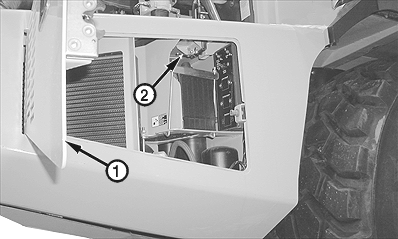
1 - Side Access Door
2 - Top Access Door Latch
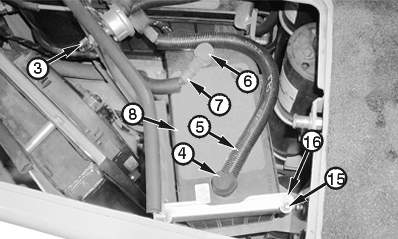
3 - Battery Disconnect Switch
4 - Outer Battery Negative (—) Terminal
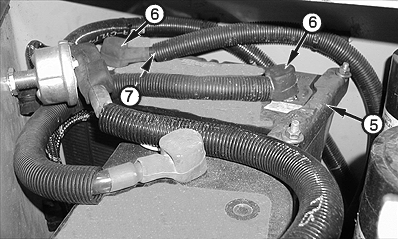
5 - Outer Battery Negative (—) Cable
6 - Outer Battery Positive (+) Terminal
7 - Battery-to-Battery Cable
8 - Outer Battery
9 - Inner Battery Positive (+) Terminal
10 - Outer Battery Positive (+) Cable
11 - Inner Battery Negative (—) Terminal
12 - Battery Balancer Cable (White)
13 - Inner Battery
14 - Main Circuit Breaker Cable (Green)
15 - Nut and Washer (4 used)
16 - Mounting Bracket Assembly (2 used)
-
Open hood. Open side access door (1).
-
Push top access door latch (2) inward and open top access door.
-
Turn battery disconnect switch (3) OFF.
-
Clean debris from battery compartment.
-
IMPORTANT: Ensure that all cables are reconnected properly. Note all connections while removing batteries, to prevent incorrect connections while installing batteries.
Disconnect all cables (5, 7, 10, 12, and 14) from battery terminals (4, 6, 9, and 11), beginning with outer battery negative (—) terminal. For each terminal, lift rubber terminal cover, remove nut, and remove washer and ring connector(s) from terminal. Move all cables aside.
-
Remove old outer battery (8) from machine, then remove old inner battery (13) from machine.
-
Loosen nuts and washers (15) on mounting bracket assembly (16). Remove mounting bracket assembly from machine.
-
Lift battery from machine through side access door.
-
-
Install new inner battery. Turn battery so positive (+) terminal faces front of machine. Install and tighten mounting bracket assembly.
-
Install new outer battery. Turn battery so negative (—) terminal faces left side of machine. Install and tighten mounting bracket assembly.
-
Install all cables, beginning at inner battery positive (+) terminal. For each terminal, install ring connector(s), washer, and nut. Pull rubber terminal cover over terminal.
-
Turn battery disconnect switch ON.
-
Start engine. After bulb check, verify that battery charge indicator on instrument panel is not lit. Verify battery voltages on monitor display unit.
|
OUO1043,0000E27-19-20011030 |