Replace Backup Light and Work Light—If Equipped
-
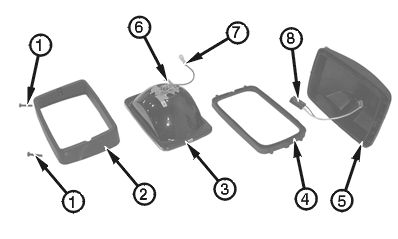
T143353B-UN-28JUN01Shown Removed from Machine for Clarity of Photo
1 - Screw (2 used)
2 - Bezel
3 - Lamp
4 - Rubber Seal
5 - Housing
6 - Terminal
7 - Wire Lead
8 - Connector
Remove screws (1). -
Remove bezel (2), lamp (3), and rubber seal (4) from housing (5).
-
Disconnect wire lead (7) from connector (8).
-
Disconnect connector from terminal (6).
-
Remove bezel and rubber seal from lamp. Discard lamp.
-
Install rubber seal and bezel on new lamp.
-
Connect connector to terminal.
-
Connect wire lead to connector.
-
Install rubber seal, lamp, and bezel in housing.
-
Install screws.
-
Adjust position of light for best illumination. If housing is loose, tighten mounting hardware (not shown).
|
OUO1079,00003D5-19-20010622 |