Hopper Door
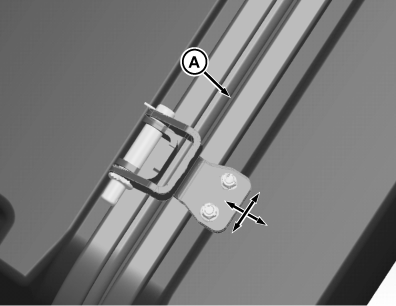
TCT011376-UN-02JUN14
A - Lip
-
Loosen the 4 door hinge bolts.
NOTE: Make sure the screen and seal do not contact the sides of the door when it is closed.
-
Center door to hopper.
-
Compress just the lip of the door seal (A) all the way around with the door in the closed position. Tighten bolts.
NOTE: Bolts can be loosened and adjusted side to side or compressed further.
-

TCT011377-UN-02JUN14A - Latch
With hopper closed and latched, put slight pressure on the door and adjust the door latch (A) to keep slight compression on the seal. -
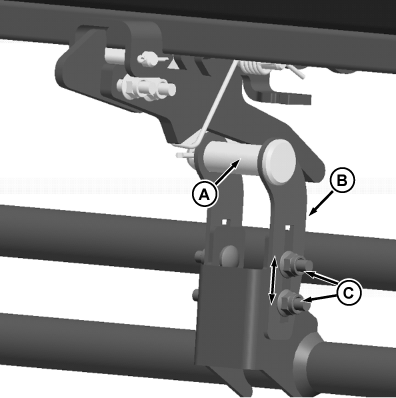
TCT011378-UN-02JUN14A - Pin
B - Latch
C - Bolts
While hopper is closed, adjust the pin (A) until it touches but does not push on door latch (B) and tighten bolts (C). -

TCT011379-UN-02JUN14A - Latch
B - Pin
C - Tilt Frame
Operate hopper (dump) open and make sure the latch (A) does not come off the pin (B) and that it is not touching the tilt frame (C). (Adjust plates horizontally if needed). -
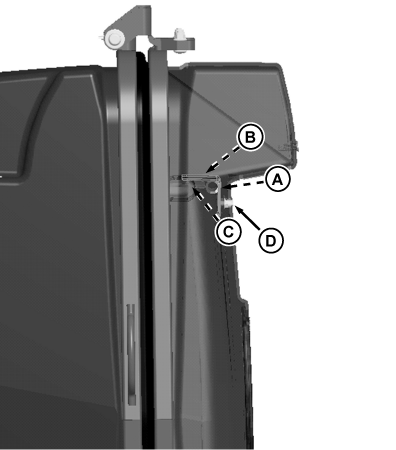
TCT011380-UN-17JUN14A - Screen Bulb Seal
B - Door Brace Support
C - Screen
D - Hardware
Close hopper and make sure the door latches fully. Repeat if necessary.Adjustment of Door Brace
- Check the Door Support position and make sure the screen bulb seal (A) is on all the way and that the door brace support (B) compresses the screen bulb seal, but does not collapse the screen bulb seal solid and causes the screen (C) to bend. Also make sure the door brace support (B) does not make contact with the screen when hopper is dumped.. The support can be adjusted up and down.
- Adjusting this higher could help the door close better.
-
Tighten Hardware (D).
|
OUO2004,0000923-19-20140617 |