Remove Cooling Shroud and Remove Debris (Model Z925M-EFI and Z930M-EFI)
 CAUTION: Compressed air can cause debris to fly a long distance.
• Clear work area of bystanders.
• Wear eye protection when using compressed air for cleaning purposes.
• Reduce compressed air pressure to 210 kPa (30 psi).
IMPORTANT: To ensure proper cooling, keep the engine cooling fins and surrounding area clean at all times. Operating the engine with obstructed cooling fins could cause engine damage due to overheating.
NOTE: Your model may be different from the model shown.
-
Park machine safely. (See Parking Safely in the SAFETY section.)
-
Allow machine to cool down.
-
Remove engine access grill.
Screen and Shroud Removal
-
Remove three screws and spacers (A) and guard (B) from blower housing.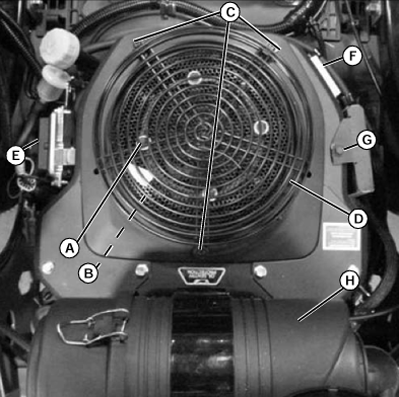
TCAL43527-UN-21MAR13 -
Remove four bolts (C) with washers and grass screen (D) from engine.
-
Remove engine control unit mounting bolts (E) to access shroud cover bolts.
-
Unplug voltage regulator (F).
-
Remove engine oil cooler bolts (G), and clean engine oil cooler fins.
-
Remove air cleaner (H) and attached air intake hose by removing the clamp at throttle body.
-
Remove two fuel line clamp bolts (K).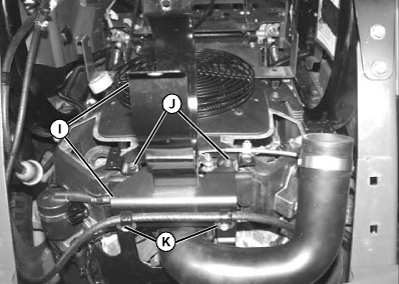
TCAL43528-UN-21MAR13 -
Remove two air cleaner bracket screws (J).
-
Remove air cleaner brackets (I).
-
Remove fuel pump bolts (L).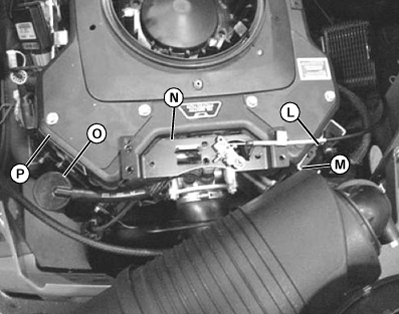
TCAL43529-UN-21MAR13 -
Remove lift bracket bolts (M).
-
Move throttle bracket (N) away from shroud.
-
Remove breather oil separator (O), mounting hardware and bracket.
-
Remove remaining bolts around shroud (P) and remove shroud.
-
Clean debris from engine area and all engine cooling fins.
Screen and Shroud Installation
-
Install engine shroud.
-
Install remaining components in reverse order of removal.
-
Tighten all hardware.
-
Install engine access grill.
|
MX00654,0000194-19-20131014 |