Cleaning Hydraulic Oil Pump Cooling Fans
 CAUTION: Compressed air can cause debris to fly a long distance.
- Clear work area of bystanders.
- Wear eye protection when using compressed air for cleaning purposes.
- Reduce compressed air pressure to 210 kPa (30 psi).
IMPORTANT: To ensure proper cooling, keep the cooling fins clean at all times. Operating the machine with obstructed cooling fins could cause damage due to overheating.
-
Park machine safely. (See Parking Safely in the Safety section.)
-
Clean hydraulic oil pump cooling fan cover (C) with a rag, brush, or compressed air.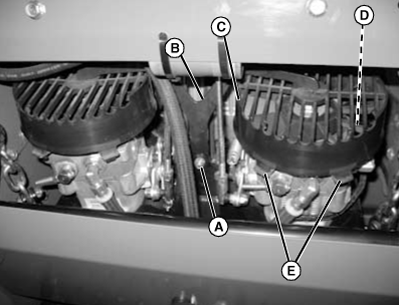
TCAL43663-UN-26MAR13 -
Clean area around hydraulic pumps and frame.
-
Remove hex nut (A) and remove the retainer bracket (B).
-
Carefully press the tabs (E) on the hydraulic oil pump cooling fin cover (C).
-
Lift the cooling fan cover from the hydraulic oil pump.
-
Clean the cooling fan (D) with a rag, brush, or compressed air.
-
Repeat the process for the second hydraulic oil pump cooling fan.
-
Install the hydraulic oil pump cooling fan cover (C) and ensure the four tabs (E) snap into place.
-
Install the retainer bracket (B) and secure with hex nut (A).
|
BB87125,0001474-19-20130708 |