Adjusting Tine Coring Depth
IMPORTANT: Avoid damage! Do not operate the machine without the depth adjustment pins in place. Damage occurs to aeration head components.
Depth must be set equally with adjustment pins on each side of the aeration head.
NOTE: Use three different-sized spacers; one 12.7 mm (0.5 in.) spacer, one 6.35 mm (0.25 in.) spacer, and one 25.4 mm (1.0 in.) alone or in combination to provide tine depth range between 63.5 mm (2.5 in.) and 90 mm (3.5 in.).
|
Coring Depth |
Spacer Placement |
|---|---|
|
63.5 mm (2.5 in.) |
Install 25.4 mm (1.0 in.) spacer below stop. Install remaining spacers above stop. |
|
70 mm (2.75 in.) |
Install 12.7 mm (0.5 in.) and 6.35 mm (0.25 in.) below stop. Install 25.4 mm (1.0 in.) spacer above stop. |
|
76.2 mm (3.0 in.) |
Install 12.7 mm (0.5 in.) spacer below stop. Install remaining spacers above stop. |
|
90 mm (3.5 in.) |
Install all spacers above stop. |
-
Raise aeration head and place transport stops into Transport position. Lower aeration head onto stops.
-
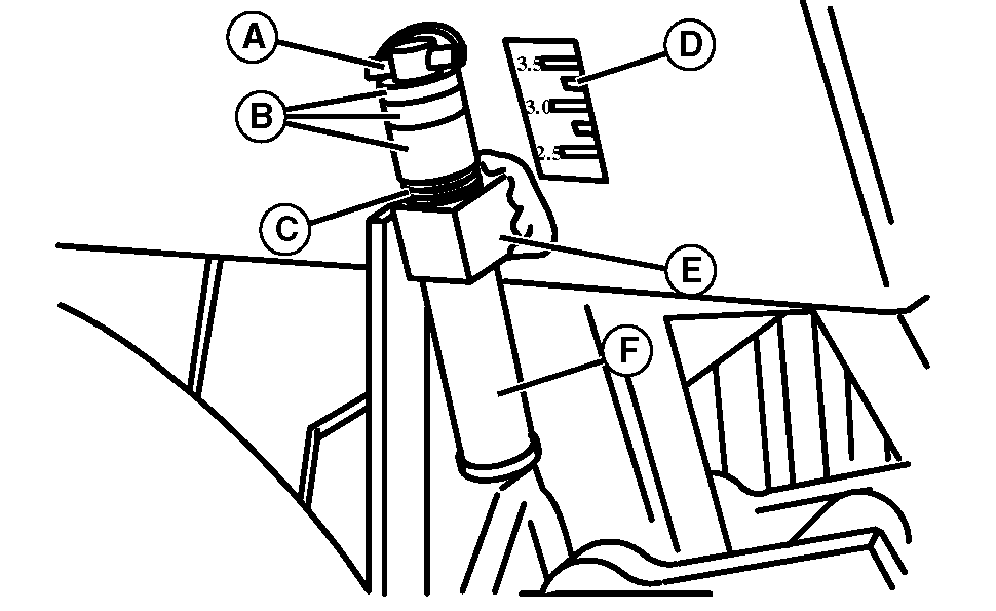
TCAL41049-UN-18JAN13Set at depth of 90 mm (3.5 in.)
Remove spring locking pin (A) from depth adjustment pin (F). -
Slide adjustment pin down through adjustment pin stop (E) to remove spacers (B) and spring (C) on pin above the stop.
-
Use the depth indicator label (D) to set tine depth. Spring locking pin is aligned selected depth on label.
-
Add or remove spacers (B) to adjustment pin below stop to achieve the desired depth.
-
Insert adjustment pin through stop. Place spring (C) and spacers not used to set depth onto adjustment pin above stop.
-
Install spring locking pin on adjustment pin to secure spacers.
|
OUO1082,000658F-19-20150611 |