Removing Covers
Aeration head cover:

TCAL41109-UN-18JAN13
-
Unhook latches (A).
-
Raise back of cover and slide cover forward (toward engine) and lift.
-
Pins (B) at sides at front of cover should slide out of locking slots and allow cover to be removed.
-
Lift cover off machine.
Right belt cover:
-
Remove aeration head cover.
-
Remove four screws (A) and one nut (B).
TCAL41110-UN-18JAN13 -
Pull cover away from machine.
Left battery cover:
-
Remove aeration head cover.
-
Remove two screws (A) and one nut (B).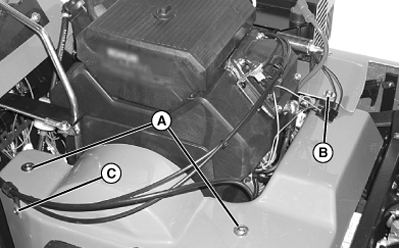
TCAL41111-UN-18JAN13 -
Remove screw (C) and nut holding cable guide to cover.
-
Lift up slightly on the corner of the right cover and pull the left cover from the machine.
-
Do not remove the spacer (D) and hardware from the left cover.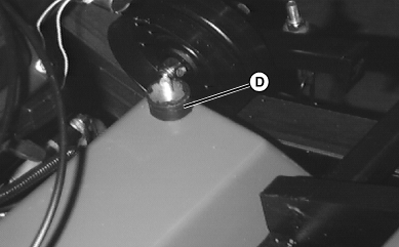
TCAL41112-UN-18JAN13
|
OUO1082,00065D0-19-20130215 |