Adjusting Frequency of Clip (FOC)
IMPORTANT: Avoid damage! Operating the reels at a high speed can cause excessive bedknife and reel wear. Operate the reels at the appropriate frequency of clip.
-
Park machine safely. (See Parking Safely in the SAFTEY section.)
-
Remove 6 mm screw (A) and cover (B) from rear of handle bar.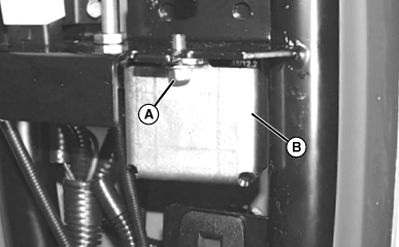
TCAL41563-UN-22JAN13 -
Locate reel speed Frequency of Clip (FOC) control box (C).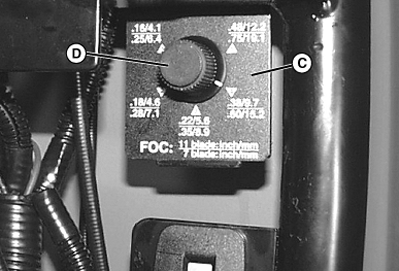
TCAL41564-UN-22JAN13NOTE: FOC can be adjusted depending on the type of application for the greens mower, which types of cutting units are used, and grass height and conditions.
FOC is infinitely variable between positions 1 and 5 on the control label (C). FOC specifications for each control position are listed on the control label and in the table that follows.
Control Position
11 Blade Reel FOC
7 Blade Reel FOC
1
4.1 mm (0.16 in.)
6.4 mm (0.25 in.)
2
4.6 mm (0.18 in.)
7.1 mm (0.28 in.)
3
5.6 mm (0.22 in.)
8.9 mm (0.35 in.)
4
9.7 mm (0.38 in.)
15.2 mm (0.60 in.)
5
12.2 mm (0.48 in.)
19.1 mm (0.75 in.)
Adjust FOC control dial (D) to desired setting for reel type, greens, and conditions. (Turning the control counterclockwise from position 1 reduces the reel speed. Turning the control clockwise from position 5 increases the reel speed.)
-
-
For mowing greens, set the control (D) to the desired FOC (Greens typically use 4.1—4.6 mm (0.16—0.18 in.) with an 11 blade reel).
-
For mowing approaches and teeboxes, reel speed can be reduced by turning the speed control knob counterclockwise.
-
-
NOTE: FOC is automatically maintained at selected setting regardless of throttle position and ground speed.
Install FOC cover (B) and secure with 6 mm screw (A).
FOC has no control over backlap reel speed. Controller override keeps backlap to 156 rpm.
|
OUO1082,00064B7-19-20150709 |