Servicing Air Cleaner Elements
IMPORTANT: When operating the machine in extreme heat, dust or other severe conditions, check the air restriction indicator daily.
• Never run the engine without the air cleaner elements installed.
• Do not wash the paper elements.
• Do not attempt to clean paper element by tapping against another object.
• Do not use pressurized air to clean element.
Primary Air Cleaner Element
-
Park machine safely. (See Parking Safely in the Safety section.)
-
Allow engine to cool.
-
Open the hood.
-
Release spring latches (A), and unhook latches from air cleaner housing.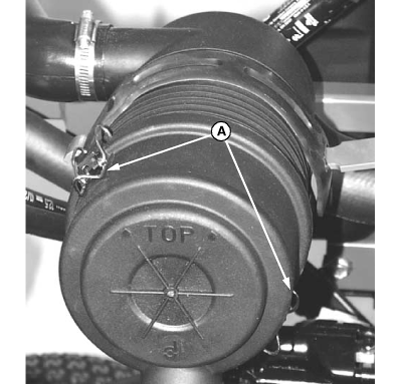
TCAL43792-UN-21MAR13 -
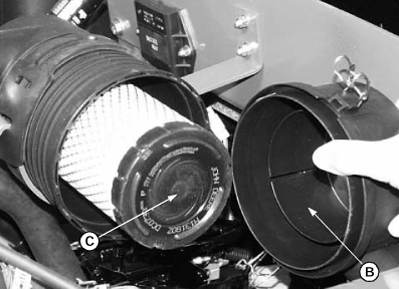
TCAL43793-UN-21MAR13B - Air Cleaner Cover
C - Primary Element
Remove air cleaner cover (B). -
Remove and discard primary element (C).
-
Install new primary element.
-
Install air cleaner cover, making sure the word “TOP” is facing upwards.
-
Reset air restriction indicator.
-
Start engine and run at high idle for one minute.
-
Stop engine. Check air restriction indicator:
- If indicator window remains yellow, air cleaner is ready for operation.
- If indicator window has turned red, change secondary air filter element.
Secondary Air Filter Element
-
Remove air cleaner cover.
-
Remove primary air cleaner element.
-
Remove and discard secondary element (A).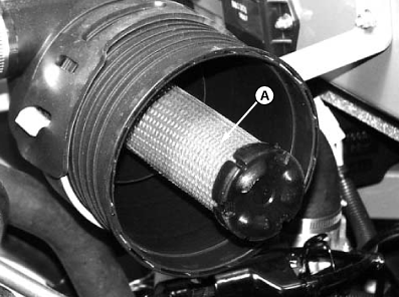
TCAL43794-UN-21MAR13 -
Install a new secondary element.
-
Install air cleaner cover, making sure the word “TOP” is facing upwards.
-
Close the hood.
|
DK75838,00006F5-19-20130326 |