Checking and Aligning Motion Control Levers
Check Alignment
-
Park machine safely. (Refer to Parking Safely in the SAFETY section.)
-
Move both motion control levers inward in the neutral position.
-
Check gap (A) between the levers. The recommended gap is 6—19 mm (1/4—3/4 in.). Adjust if gap is outside recommendation.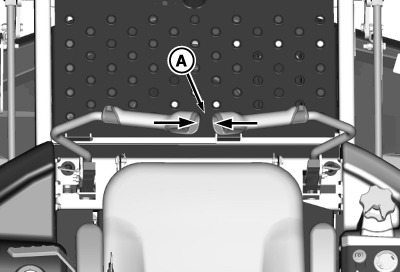
TCT011215-UN-02JUN14 -
If the horizontal position of the control levers (B) are not equal, an adjustment is necessary.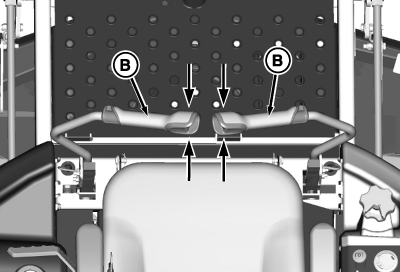
TCT011216-UN-02JUN14
Adjusting Lever Gap
-
Put the levers in neutral position.
-
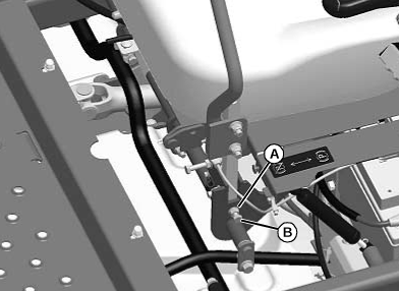
TCAL43821-UN-21MAR13Parts have been removed for photo clarity.
Loosen jam nut (A).Turn set screw (B):- Clockwise to move lever outward
- Counterclockwise to move lever inward
-
Tighten jam nut.
NOTE: Adjust levers alternating from side to side.
Adjusting Lever Horizontal Alignment
- Adjust position of motion control levers:
-
Loosen bolts and nuts (A).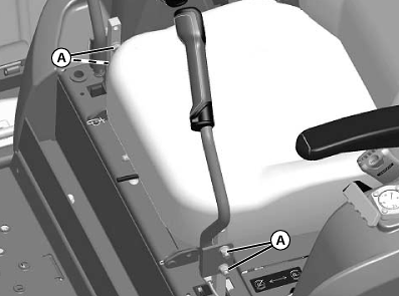
TCAL43822-UN-21MAR13 - Pivot both levers forward or rearward until levers are aligned.
- Tighten bolts and nuts.
Adjusting Lever Height
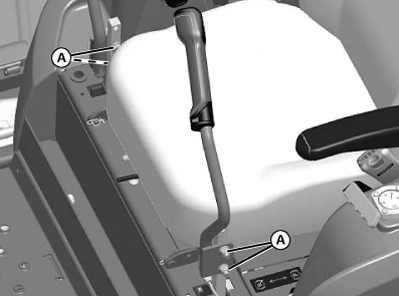
The levers have two height adjustment positions. To change position:
TCAL43823-UN-21MAR13
-
Loosen and remove the bolts and nuts (A) securing the levers to the linkage.
-
Align the levers with the second of holes in the linkage.
-
Install the bolts and nuts and tighten securely.
|
OUMX068,00007E7-19-20140602 |