Front Quick Hitch Compatibility
Compatibility—Quick Hitch and Mid Mower
-
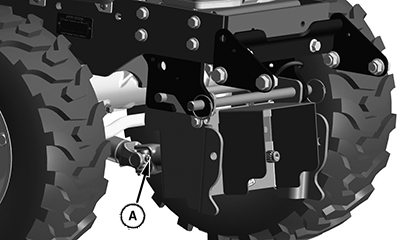
LV27370-UN-01FEB17A - Drive Shaft
Remove the PTO drive shaft (A), if installed. -
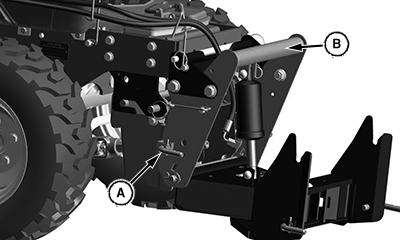
LV27369-UN-01FEB17A - Locking Pin
B - Front Hitch
Move the locking pin (A) to the open position. -
Remove the quick hitch (B).
-
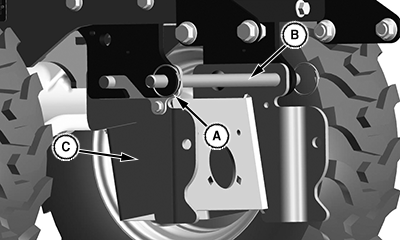
LV27475-UN-01FEB17A - Locking Ring
B - Front Hitch Pin
C - Mounting Assembly
Remove the locking ring (A) and remove front hitch pin (B) -
Remove the mounting assembly (C).
-
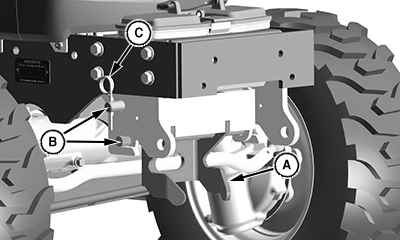
LV27460-UN-01FEB17A - Draft Link
B - Front Hitch Pin
C - Locking Pin
Install the front draft bracket for the mower.-
Install the front draft link (A) onto mounting brackets as shown.
-
Install front hitch pins (B).
-
Secure with locking pin (C).
-
-
Install the AutoConnect™ mower kit, if it was removed previously.
-
Install the mower deck.
Compatibility—Quick Hitch and Loader
-
Remove the PTO drive shaft, if it is installed.
-
Remove the quick hitch.
-
Remove the quick hitch mounting bracket.
-
Install loader.
|
AutoConnect is a trademark of Deere & Company |
UP00731,00001D5-19-20170208 |