Remove and Install Side Panels
To Remove the Side Panels:
-
Park machine safely.
-
Raise hood.
-
On cab tractors:
-
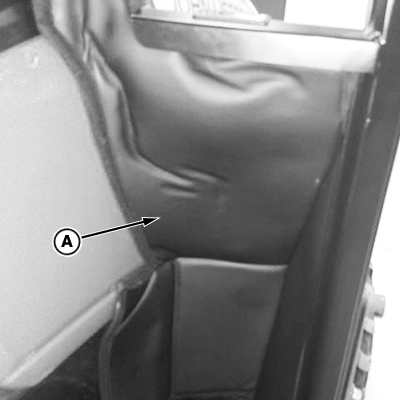
LV30572-UN-04APR19Front Foam Padding—Cab Tractor
Pull the front foam padding (A) back enough to gain access to the three finger screws (B).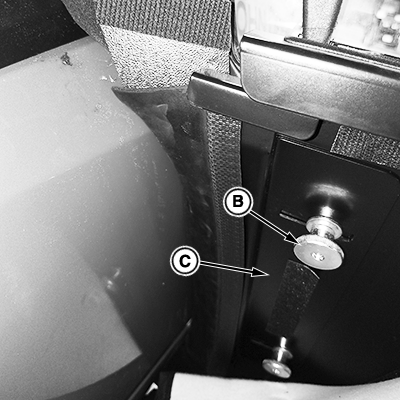
LV30573-UN-04APR19 -
Loosen the finger screws (B) and slide the closeout plate away from the side panel.
-
-
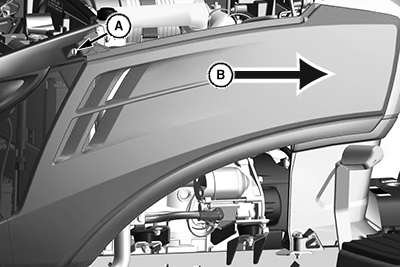
LV27349-UN-25JAN17Left side shown.
A - Locking Pin
B - Rear Of Machine
To release the side panel, turn the locking pin (A) a 1/4 turn. -
Slide the side panel toward the rear (B) of the machine until all the tabs clear their mounting slots in the machine. Remove the side panel.
-
Damage can result to locking pin when closing the hood. Make sure that locking pin is back into place before closing the hood.
Push locking pin (A) back into place.
To Install Side Panels:
-
Align the panel mounting tabs with the mating slots in the machine.
-
Pull locking pin and slide the panel forward to install. Turn locking pin a 1/4 turn to lock into place.
-
On cab tractors:
-
Slide closeout plate back into position against the side panel.
-
Tighten the three finger screws.
-
Install the front foam padding and secure back into place.
-
-
Lower the hood.
|
UP00731,0000910-19-20190403 |