Using Drawbar Hitch
 CAUTION: Avoid Injury! Use only the drawbar that was provided
with the machine (if equipped), or the optional drawbar available
from your John Deere Dealer. Do not install or use any other type
of drawbar.
CAUTION: Avoid Injury! Use only the drawbar that was provided
with the machine (if equipped), or the optional drawbar available
from your John Deere Dealer. Do not install or use any other type
of drawbar.
To avoid rearward upset, all towed loads must be attached to the drawbar, not just to the center link or draft arms.
IMPORTANT: Avoid damage! Maximum static vertical load on drawbar not to exceed maximum recommendations. Drive slowly with heavy loads.
Maximum Drawbar Loads
Certain heavy equipment such as a loaded single-axle trailer can place excessive strain on the drawbar. Strain greatly increased by speed and rough ground. Do not exceed the following maximum static vertical loads on drawbar, see Specifications section.:
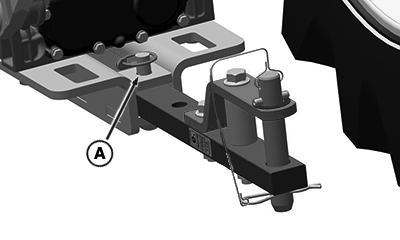
Drawbar Removal
LV28777-UN-22JUN17
A - Quick-Lock Pin
-
Remove quick-lock pin (A) and drilled pin.
-
Pull drawbar from machine bracket.
Drawbar Installation
-
Install drawbar into machine mounting bracket.
-
Install drilled pin up from bottom of machine. Install quick-lock pin (A).
Towing Loads
CAUTION: Avoid injury! Stopping distance increases with speed
and weight of towed load, and on slopes. Towed loads, with or without
brakes, that are too heavy for the machine or are towed too fast can
cause loss of control. Consider the weight of the equipment and its
load.
Ensure that load does not exceed recommended weight. The machine must be heavy and powerful enough with adequate braking power for the towed load. Use additional caution and reduce speed when towing loads under adverse surface conditions, when turning, and on inclines.
- Hitch the towed load only to the drawbar. Lock the drawbar and pin in place.
- Install a safety chain to the machine drawbar support and to the towed load. Provide only enough slack to permit turning.
- Before descending a hill, shift to a gear low enough to control machine without having to use the brake pedal.
|
UP00731,0000384-19-20170907 |