Using Hitch Assist—Cab Tractors
Activating Hitch Assist
NOTE: PTO must be off.
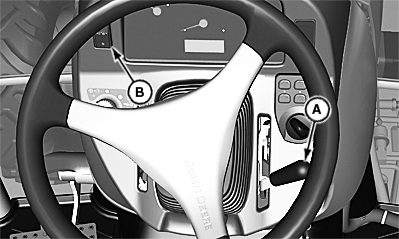
LV20964-UN-04FEB14
Cab
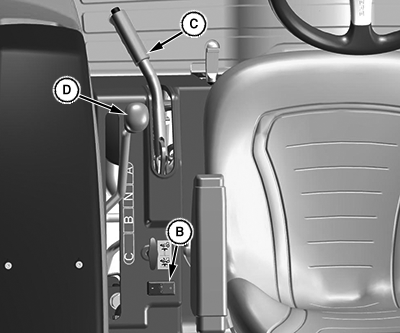
LV28074-UN-29MAR17
Open Operator Station
A - Hand Throttle
B - Hitch Assist Switch
C - Park Brake
D - Transmission Range Shift Lever
-
Sit on operator’s seat with the engine running.
-
Hand throttle (A) must be at low idle.
-
Fully engage park brake (C); when fully engaged, park brake light on the instrument panel starts to blink.
-
Transmission range shift lever (D) must be in the “A” range.
-
Engage hitch assist switch (B). Warning lights begins to flash when feature is active.
NOTE: If any of the interlock conditions are not met, the instrument control panel displays which interlock needs attention.
-
When the operator gets out of the seat, five audible beeps signaling that hitch assist is engaged sound and the warning lights flash at low frequency.
Operating Hitch Assist
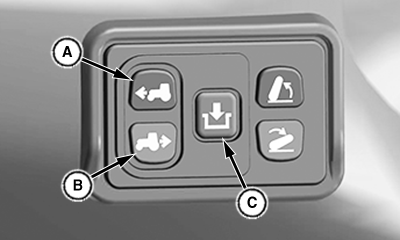
LV29049-UN-26JUL17
A - Forward Switch
B - Reverse Switch
C - Hitch Engagement Switch
Press forward switch (A) or reverse switch (B) while holding the hitch engagement switch (C).
Disabling Hitch Switch
The rear controls can be disabled in three different ways:
• Sitting on the seat.
• Turning off the hitch assist switch.
• Any change in interlock state.
NOTE: To resume normal operation, hitch assist switch in the operator station must be turned off.
|
UP00731,0000410-19-20170905 |