Use Display Mode Switch
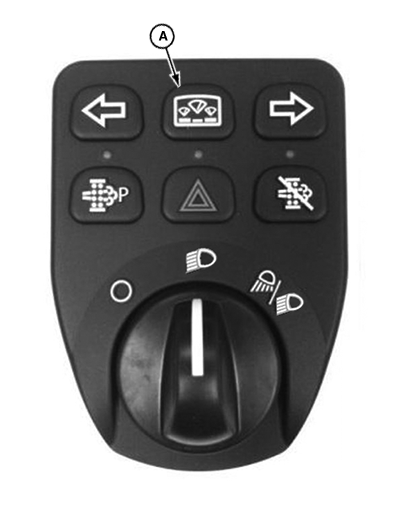
LV22250-UN-23JUN14
A - Display Mode Switch
The display mode switch (A) can be used to scroll through hour meter and active error codes display on all machines. The display information changes automatically as long as the display mode switch is pressed in the current cycle.
By repeatedly pressing the display mode switch you can scroll through the functions in the following order.
- Engine hour meter
- Ground speed on all models, excluding PRT tractors
- Vehicle hour
- PTO hour
- Soot percentage
- Hour since last regeneration
Adjust Backlighting
-
NOTE: Both brightness and dimmer settings can be adjusted. Brightness is the term used when the light switch is “OFF”. When the light switch is “ON”, the backlight is referred to as dimmer. The backlight reflects the stored settings as the light switch is operated.
Press and hold the display mode switch for approximately 5 seconds until “Release” appears on the display. Display is now in command mode.
-
Use the turn signals to toggle to “Brightness” or “Dimmer”. (This depends on the position of the light switch.)
-
Press the display mode switch again to accept.
-
To toggle to the desired setting, press the left or right turn signal. The range for illumination is 1—9.
-
Press the display mode switch again to exit command mode.
Adjust Ground Speed Unit
-
Press and hold the display mode switch for approximately 5 seconds until “Release” appears on the display. Display is now in command mode.
-
Use the turn signals to toggle to “Units”.
-
Press the display mode switch again to accept.
-
Use the left or right turn signal to toggle between “km/h” and “mph”.
-
Press the display mode switch again to exit command mode.
Change Display Language
-
Press and hold the display mode switch for approximately 5 seconds until “Release” appears on the display. Display is now in command mode.
-
Use the turn signals to toggle to “Language”.
-
Press the display mode switch again to accept.
-
Use the left or right turn signal to toggle between available languages.
-
Press the display mode switch again to exit command mode. Selected language will appear after key switch is cycled OFF/ON.
|
JC48530,00000A1-19-20190925 |