Operate Reverse Implement Option (RIO)
 CAUTION: Rotating blades are dangerous. Children or bystanders
may be injured by runover and rotating blades.
CAUTION: Rotating blades are dangerous. Children or bystanders
may be injured by runover and rotating blades.
Before backing up, carefully check the area around the machine.
NOTE: NOTE: Backing up while mower is engaged is discouraged. Only use the reverse implement option when operating another attachment or when the operator deems it necessary to reposition machine with mower engaged.
-
Stop machine forward travel with attachment engaged.
-
Look behind the machine to be sure that there are no bystanders.
-
NOTE: If attachment stops while repositioning the machine, return the PTO/RIO switch to the off position. Begin again with Step 2 in procedure. If the reverse pedal is depressed without engaging the PTO/RIO switch, “rIo” is displayed in the information display and the engine shuts down.
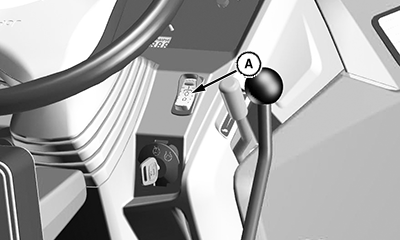
LV26740-UN-04NOV16A - PTO/RIO Switch
To activate the reverse implement option, press PTO/RIO switch (A) down past PTO engagement position. -
Press the reverse travel pedal and release the RIO switch. Information display shows “rIo Act”.
NOTE: RIO function stays enabled until tractor stops or forward motion is detected.
-
As machine begins to move backward, reposition the tractor.
-
Resume forward travel. The attachment continues to operate.
-
Repeat Steps 1 through 5 to reposition machine again.
NOTE: If the operator leaves the seat with the engine running and the mid-PTO engaged, the safety interlock system stops the engine and all implements.
|
JC48530,000047D-19-20200728 |