Remove Cooling Shroud and Remove Debris (Z915E)
 Compressed air can cause debris to fly a long distance.
• Clear work area of bystanders.
• Wear eye protection when using compressed air for cleaning purposes.
• Reduce compressed air pressure to 210 kPa (30 psi).
To ensure proper cooling, keep the engine cooling fins and surrounding area clean always. Operating the engine with obstructed cooling fins could cause engine damage due to overheating.
-
Park machine safely. (See Parking Safely in the SAFETY section.)
-
Allow engine to cool.
-
Remove engine access grill.
-
Loosen and remove three socket head bolts (A) and remove fan screen guard (B).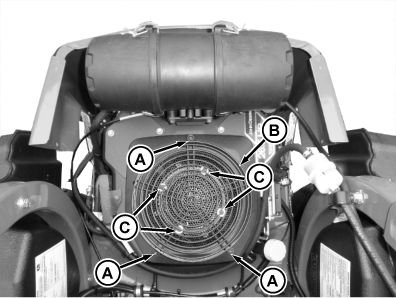
TCT011982-UN-18NOV14 -
Remove four hex head bolts (C), fan screen, and metal ring below fan screen.
-
Remove two fuel pump bolts (D).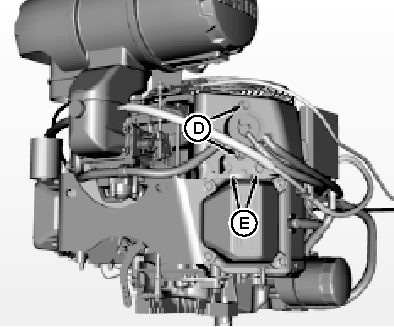
TCT011311-UN-16JUN15 -
Remove two shroud/lift bracket bolts (E).
-
Remove dip stick mounting bolt (F) and dipstick housing (G) from engine.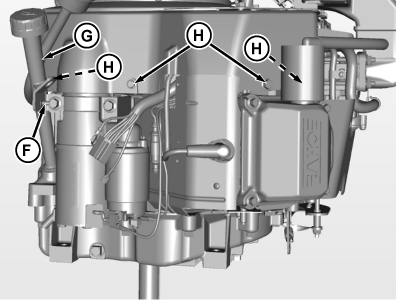
TCT011997-UN-20NOV14 -
Remove four shroud bolts (H). Install dipstick housing (G) on engine and secure with one bolt (F).
-
Remove wiring harness connector (I) from voltage regulator.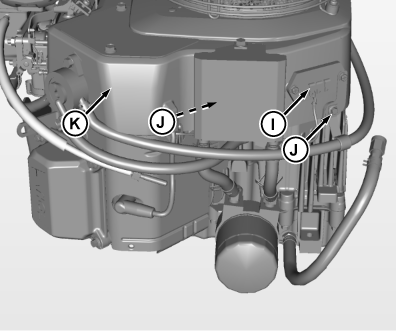
TCT011998-UN-20NOV14 -
If engine is equipped with an oil cooler, remove mounting bolts.
-
Remove two shroud bolts (J). Lift shroud (K) upward and remove from engine.
-
Clean debris from engine area and all engine cooling fins.
-
Reverse steps to install shroud and tighten all hardware securely.
-
Install engine access grill.
|
MX52301,0000EE3-19-20160323 |