Cleaning Engine Shroud
 CAUTION: Avoid injury! Compressed air can cause debris to fly
a long distance.
CAUTION: Avoid injury! Compressed air can cause debris to fly
a long distance.
• Clear work area of bystanders.
• Wear eye protection when using compressed air for cleaning purposes.
• Reduce compressed air pressure to 210 kPa (30 psi).
IMPORTANT: An obstructed air intake screen can cause engine damage due to overheating. Keep air intake screens and other external surfaces of the engine, including cooling fins, clean at all times to allow adequate air intake.
For models Z535M and Z535R, also clean fins on oil cooler.
CAUTION: Avoid injury! Touching hot surfaces can burn skin.
The engine, components, and fluids are hot if the engine has been
running. Allow the engine to cool before servicing or working near
the engine and components.
Model Z525E
-
Park machine safely. (See Parking Safely in the SAFETY Section.)
-
Clean air intake screen and external engine surfaces (see Cleaning Air Intake Screen and Engine Fins in ENGINE Section).
-
Locate rotating screen guard (A) at top of engine, and the two retaining tabs (B), embossed with a finger symbol. Remove screw at front of screen guard (if equipped).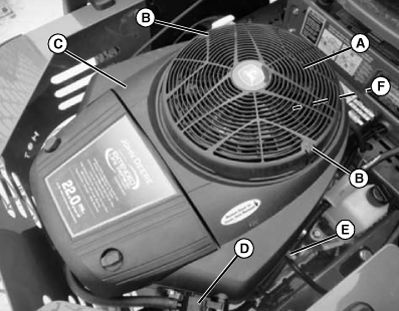
MXAL47081-UN-16APR13 -
Push in on the two retaining tabs and lift off guard (A).
-
Clean guard and flywheel cover of debris.
-
IMPORTANT: Be careful to maintain position of fuel pump assembly (D), clips, (E) and fuel line. Also any other attached components when removing parts from side of engine.
Remove bolts and engine shroud (C).
-
Remove four bolts and rotating screen (F).
-
Clean debris from: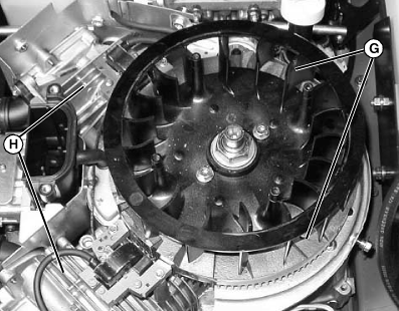
MXAL47082-UN-16APR13- Fan areas (G)
- Cylinder head cooling fins (H)
- Engine cooling fins
- Area between engine and frame
-
Install rotating screen with four bolts.
-
IMPORTANT: Engine shroud must be assembled so that slots in shroud align with ridge in air intake and mating surfaces along sides of engine. Failure to assemble correctly will prevent the air filter from sealing and may cause engine damage.
Install shroud with hardware.
Models Z535M and Z535R
-
Park machine safely. (See Parking Safely in the SAFETY Section.).
-
Clean air intake screen and external engine surfaces (see Cleaning Air Intake Screen and Engine Fins in ENGINE Section).
-
Remove air cleaner cover.
-
Loosen clean out port screws (A) until the cover can be removed.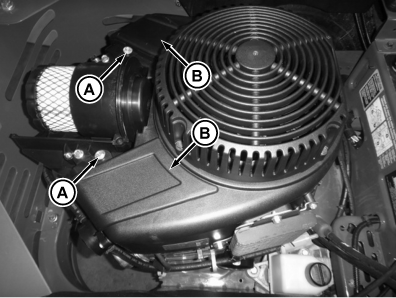
GXT001680-UN-16SEP14 -
Remove port covers (B).
-
Clean debris from clean out ports (C) on either side of air cleaner.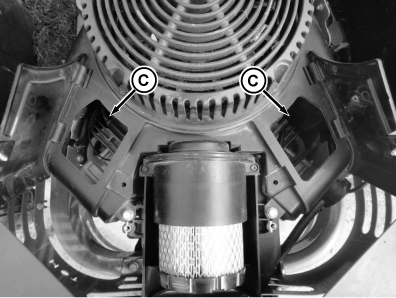
GXT001681-UN-27OCT14 -
Install port covers.
-
Secure with screws that were previously loosened.
-
Install air cleaner cover.
-
Clean fins on oil cooler (D) (if equipped) as needed.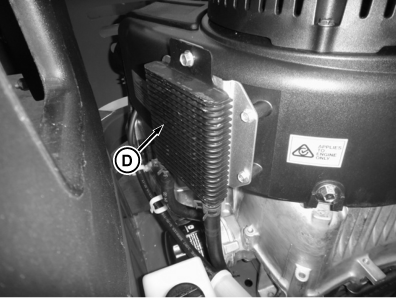
GXT001684-UN-17SEP14
Models Z540M and Z540R
-
Park machine safely. (See Parking Safely in the SAFETY Section.)
-
Clean air intake screen and external engine surfaces (see Cleaning Air Intake Screen and Engine Fins in ENGINE Section).
-
Loosen two knobs and remove air cleaner cover (A) and air filter.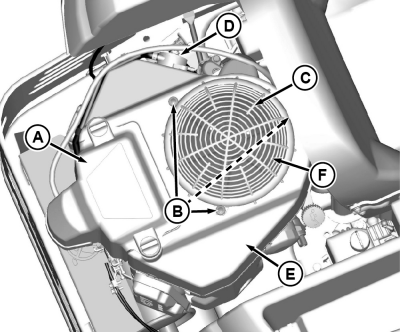
GXT002418-UN-15JUL15 -
Remove three rivets (B) by prying them up using a screwdriver under the head until it pops up.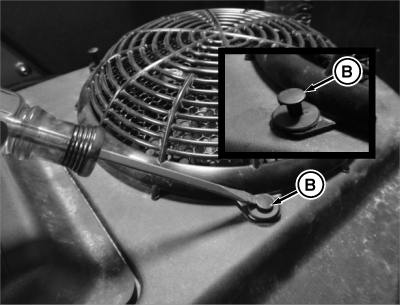
MXT005379-UN-31JUL13 -
Remove the rotating screen guard (C).
-
IMPORTANT: Be careful to maintain position of fuel pump assembly (D), clips for fuel line, and any other attached components when removing parts from side of engine.
Remove two screws holding fuel pump (D) to side of engine.
-
Remove bolts, the rotating screen, (F) and engine shroud (E).
-
Clean debris from: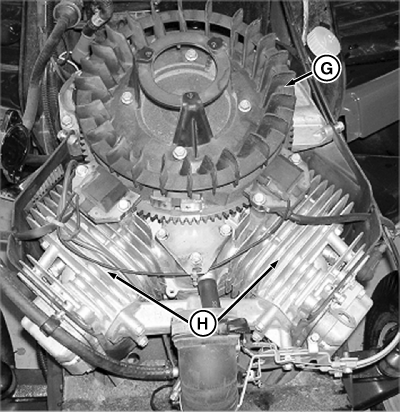
MXT005356-UN-31JUL13- Fan areas (G)
- Cylinder head cooling fins (H)
- Area between engine and frame
-
IMPORTANT: Engine shroud must be assembled so that the slots in the shroud align with ridge in air intake and mating surfaces along sides of engine. Failure to assemble correctly will prevent the air filter from sealing and may cause engine damage.
Install shroud, fuel pump, rotating screen and any other components removed earlier.
-
Install rotating screen guard with three rivets. Rivets can be reinstalled by pushing them into the fastened position.
-
Install air filter and air cleaner cover.
|
TH84124,00001F5-19-20150731 |