Removing and Installing Battery
Removing
-
Park the machine safely. (See Parking Safely in the SAFETY section.)
-
To aid in the removal of the side panel, remove air cleaner cover for clearance.
Remove four screws (A) and five push retainers (B), and remove side panel (C).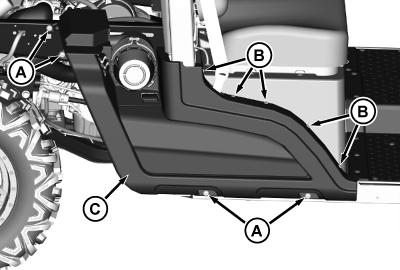
MXT020778-UN-29AUG17 -
Disconnect the negative (-) battery cable (D) from the battery.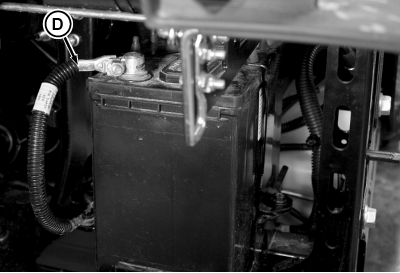
MXT020779-UN-29AUG17 -
Remove screw (E) on each side of the battery securing the mounting bracket (F).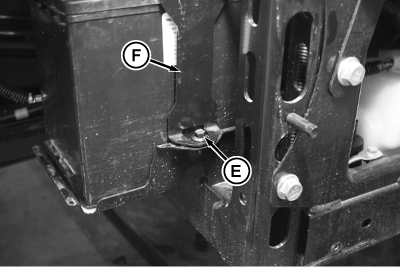
MXT020780-UN-29AUG17 -
Remove mounting bracket by lifting it over the negative (-) post.
-
Lift and slide the battery half way off the tray toward the rear of the machine.
-
Slide back rubber protective cover (G) and disconnect the positive (+) battery cable (H) from the battery.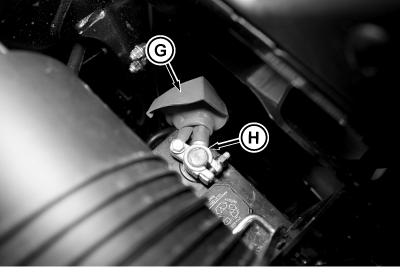
MXT020781-UN-29AUG17 -
Remove battery from the machine.
Installing
-
Install battery half way into the battery tray with the negative (-) terminal positioned toward the rear of the machine.
-
Connect positive (+) cable to positive (+) battery terminal. Tighten the hardware.
-
Apply general-purpose grease or silicone spray to positive (+) battery terminal to help prevent corrosion.
-
Slide protective cover down the positive (+) cable and seat it over the positive (+) terminal.
-
Slide the battery forward until it is properly seated in the tray.
-
On winch ready machines, be sure that the mounting bracket (A) is clear of the negative (-) cable (B) for the winch power.
Slide the mounting bracket over the negative (-) post and install with two screws. Tighten the screws.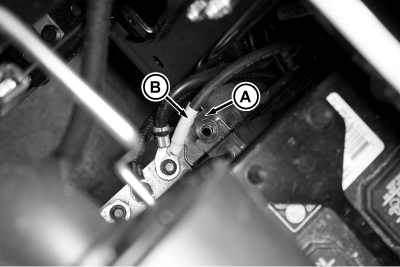
MXT020782-UN-29AUG17 -
Connect negative (-) cable to negative (-) battery terminal. Tighten the hardware.
-
Apply general-purpose grease or silicone spray to negative (-) battery terminal to help prevent corrosion.
-
Install the side panel.
-
Install air cleaner cover.
-
Lower the cargo box.
|
MX10673,0000033-19-20170908 |