Using Rear PTO (Optional)
Engaging PTO
-
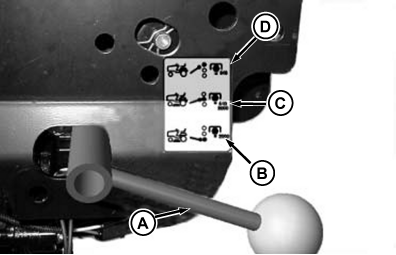
MXT015555-UN-14AUG15A - Selector Handle
B - Front/Mid PTO Position
C - Front/Mid PTO and Rear Position
D - Rear Only PTO Position
With engine off and park brake on, use the PTO selector handle (A) to choose between front/mid PTO position (B), front/mid PTO and rear PTO position (C), or rear only PTO position (D). -
Get back on the tractor.
-
Start Engine.
-
After engine has warmed move throttle lever to maximum engine speed.
-
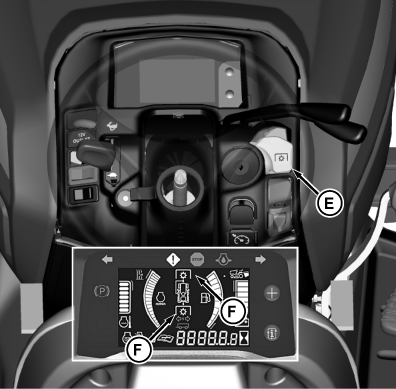
MXT015556-UN-14AUG15E - PTO/RIO Switch
F - PTO Indicator
Pull PTO/RIO switch (E) up. Instrument cluster PTO indicator (F) comes on when PTO is engaged.
Disengaging Optional Rear PTO
Push PTO/RIO switch down to disengage the PTO. Instrument cluster PTO indicator goes out.
Any PTO interlock violations cause PTO indicator to flash, as PTO is not engaged.
|
MX52301,0000FE5-19-20160719 |