Remove Cooling Shroud and Remove Debris (Z740R)
 Compressed air can cause debris to fly a long distance.
• Bystanders should avoid work area.
• Wear eye protection when using compressed air for cleaning purposes.
• Reduce compressed air pressure to 210 kPa (30 psi).
To ensure proper cooling, keep the engine cooling fins and surrounding area clean at all times. Operating the engine with obstructed cooling fins could cause engine damage due to overheating.
-
Park machine safely. (See Parking Safely in the SAFETY section.)
-
Allow machine to cool down.
-
Clean external engine surfaces.
-
Loosen and remove three hex socket head bolts (A) and remove fan screen guard (B).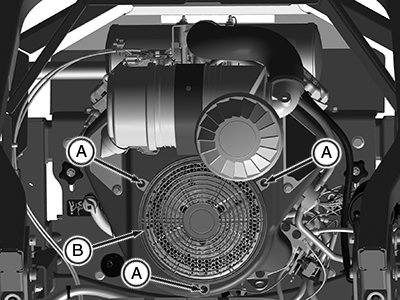
APY11727-UN-01AUG18 -
Open air cleaner latch (C) and remove air cleaner assembly (G) from top of engine.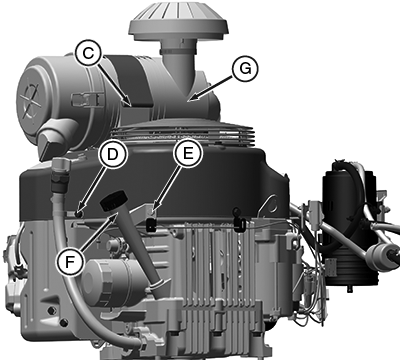
APY11737-UN-01AUG18 -
Remove drain hose assembly mounting bolt (D).
-
Remove dipstick mounting bolt (E) and dipstick housing (F) from engine.
-
Remove two hex head bolts (I) and remove fuel pump.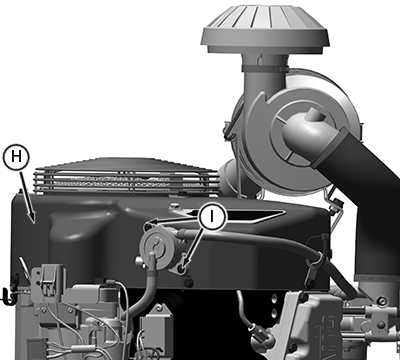
APY11738-UN-11AUG18 -
Remove remaining four engine shroud hex head bolts.
-
Lift shroud (H) upward and remove from engine compartment.
-
Clean debris from:
- Fan areas
- Cylinder head
- Cooling fins
- Area between engine and frame
-
Install shroud, fuel pump, dipstick housing, drain hose assembly and all the clips attached respectively.
Engine shroud must be assembled so that the slots in the shroud align with the ridge in the air intake and mating surfaces along sides of engine. Failure to assemble correctly prevents the air filter from sealing and may cause engine damage.
-
Install fan screen guard (B) and tighten three hex socket head bolts (A).
-
Install air filter.
|
MG39705,00000F0-19-20180811 |