Checking and Replacing Air Filtration System (Z735E and Z735M)
Dirt and debris can enter the engine when removing the air cleaner elements. Service elements only at prescribed intervals.
-
Park the machine safely. (See Parking Safely in the SAFETY section.)
-
Let engine cool.
-
Clean dirt and debris from the air cleaner cover.
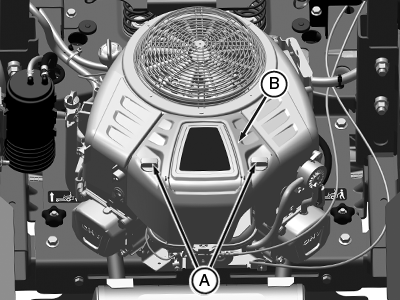
APY04437-UN-30JUL18 -
Loosen and unscrew two knobs (A) and remove cover (B).
-
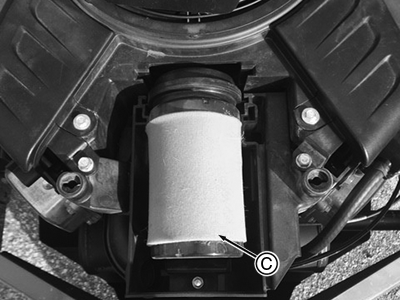
APY11718-UN-01AUG18(Z735E Model Shown)
Take out filter cartridge (C) and inspect it for damage.During filter cartridge removal, any material or foreign object that enters the air intake must be removed before replacement of the cartridge.
-
Inspect the foam pre-cleaner without removing it. If the foam pre-cleaner is dirty:
- Remove it from the filter carefully.
-
Wash pre-cleaner in a solution of warm water and liquid detergent.
Do not oil pre-cleaner. Oil gets absorbed into the paper
filter element and results in poor engine performance.
- Rinse pre-cleaner thoroughly. Squeeze out excess water in a dry cloth until pre-cleaner is dry.
-
Replace the pre-cleaner if damaged.
-
Inspect paper filter element. Replace element only if it is dirty, damaged or the seal is cracked.
Dirt and debris can enter the engine through a damaged filter element.
-
Clean air cleaner base carefully.
-
Install paper filter element with foam pre-cleaner mesh in upward position.
-
Position air filter in air filter base and align air filter.
-
Install air cleaner cover and tighten knobs. Do not overtighten.
|
MG39705,00000F4-19-20180912 |