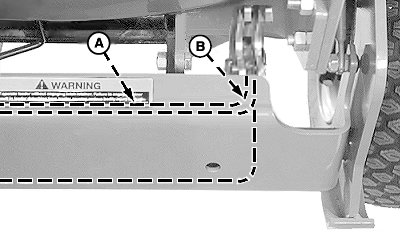
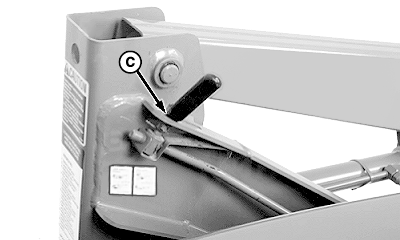
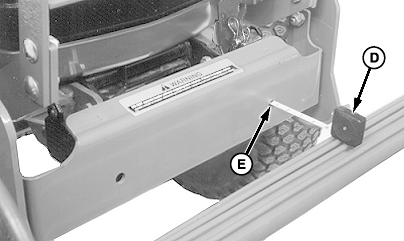
Checking and Adjusting Latch Plate and Locking LeverNOTE: 430 on 970 and 1070 Tractor; Latch is located on right-hand mast. Loader for 990 and 4000 series tractor shown. 1. Lower loader to the ground and apply enough downward force to relieve weight from tires.2. Rotate latch plate over weight bracket (A), it should rotate freely. 3. Check for interference at location (B). Grind or file material to eliminate any obstruction. 4. Latch lever must be in hole (C) and free to move up and down. 5. Using tape measure (D) through hole (E), measure distance from weight bracket-to-front surface of latch. It should be no more than specification. Specification
|
|
OUMX005,0001806 -19-23FEB04-1/2 |
|
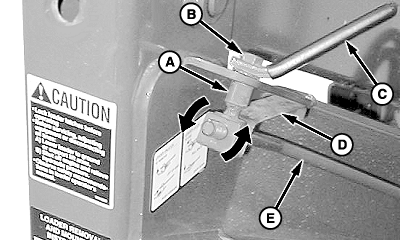
IMPORTANT: Pin (A) MUST NOT be tight in hole. For correct operation, pin must be loose allowing spring (D) to keep lever in locked position. 6. If pin (A) is tight in hole or is still in slot with latch plate closed, adjust latch rod: a. Remove cap screw (B) to disconnect lever (C) from pin (A). b. Rotate pin (A) (in or out) on rod (E) until pin fits freely in hole and dimension at latch and weight bracket is within specification. Specification
c. Apply thread lock and sealer (high strength) to threads of cap screw. d. Attach lever to pin in reverse order as disassembled. |
|
OUMX005,0001806 -19-23FEB04-2/2 |