Attaching Ballast Box to Tractor Hitch
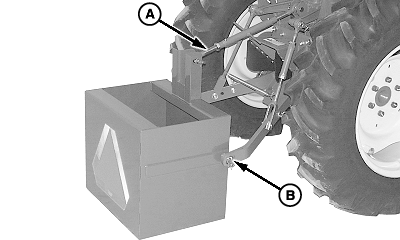
To avoid bodily injury or machine damage whenever the ballast box is attached, put transmission in PARK position and check the full range of hitch for interference or binding. Do not stand between tractor and ballast box. Three-Point Hitch1. Back up tractor to ballast box with hitch points approximately in alignment. 2. Engage tractor parking brake and/or place transmission in PARK . 3. Shut off tractor engine and remove key. 4. Attach tractor draft links. Fasten with quick-lock pins (B) (stored on tractor draft links). 5. Align center link with upper hole in ballast box mounting straps and install center link mounting hardware (A). 6. Start tractor engine. |
|
 CAUTION:
To help prevent personal injury from tractor instability, be sure to attach ballast box before attempting to attach loader.
CAUTION:
To help prevent personal injury from tractor instability, be sure to attach ballast box before attempting to attach loader.
OUO6077,0001668 -19-01NOV06-1/3 |
|
7.
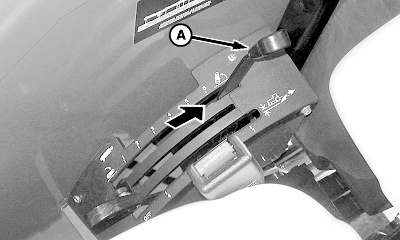
Slowly pull hitch control lever (A) to raise ballast box. Check for interference. Lower hitch to ground and adjust center link and/or lift links if necessary. (See procedures in your tractor Operator's Manual.)
|
|
OUO6077,0001668 -19-01NOV06-2/3 |
|
Quick Coupler Hitch
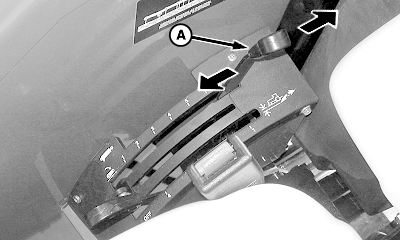
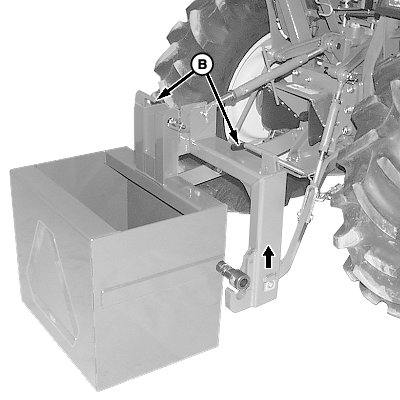
1. Slowly push hitch control lever (A) to lower hitch until quick coupler hooks are lower than ballast box hitch pins. 2. Back up tractor to ballast box. IMPORTANT: Check spring loaded clips on quick coupler to be sure latches are free and working properly. 3. Make sure latch control levers (B) are down (as shown). 4. Slowly pull hitch control lever (A) to engage ballast box hitch pins in quick coupler hooks. Raise ballast box and check for interference. Lower ballast box to ground and adjust if necessary.
|
|
OUO6077,0001668 -19-01NOV06-3/3 |