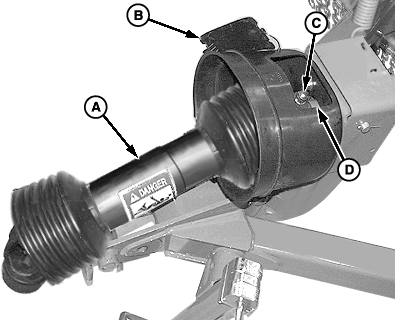
Removing and Installing PTO Drivelines-Pull-Type1. Remove cover (B).2. Remove lock nut and cap screw (C). Remove cap screw using a brass drift and hammer. 3. Remove main driveline (A) from intermediate driveline shaft. 4. Remove spacer (D).
|
|
OUO6038,0001A1F -19-20SEP07-1/4 |
|
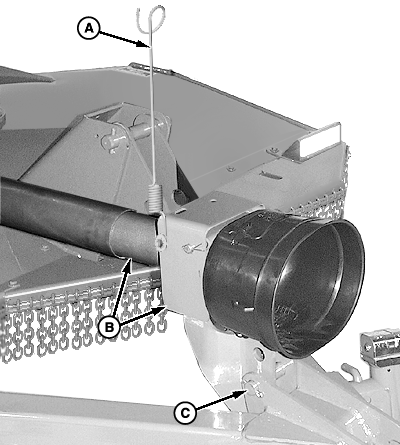
5.
Remove hydraulic hose from holder (A).
6. Support pedestal and remove cotter pin and pin (C). 7. Remove pedestal and front half of intermediate driveline (B).
|
|
OUO6038,0001A1F -19-20SEP07-2/4 |
|
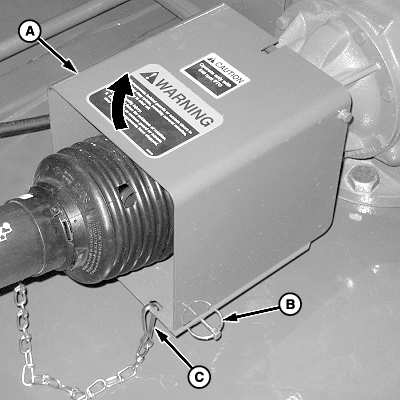
8.
Disconnect chain (C).
9. Remove two quick-lock pins (B) and raise PTO shield (A).
|
|
OUO6038,0001A1F -19-20SEP07-3/4 |
|
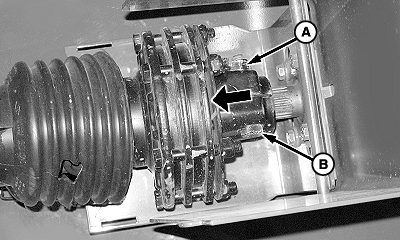
10.
Remove lock nut (A) and cap screw (B) from clutch hub.
11. Remove driveline assembly from gear case input shaft. 12. Make repairs as necessary:
13. Install driveline in reverse order of removal using the following special instructions:
Specification
|
|
OUO6038,0001A1F -19-20SEP07-4/4 |