Check and Adjust Anti-Spill System Limit Switches
Bucket Anti-Spill Limit Switches
-
NOTE: Anti-spill system shown removed for illustrative purposes.
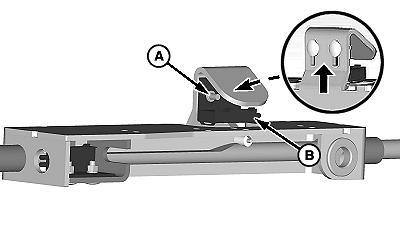
W22289-UN-11JUN12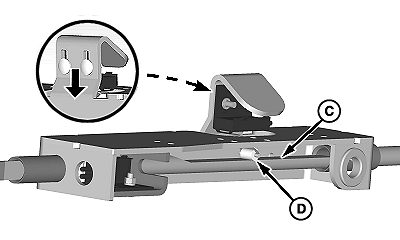
W22290-UN-11JUN12A - Round-Head Bolts, Washers, and Nuts (2 per switch)
B - Switch
C - Sensor Bar
D - Roller
Loosen nuts (A) and adjust switch (B) until roller (D) contacts sensor bar (C) and switch arm is compressed. -
Using a continuity tester, confirm switch is closed (has continuity) when switch actuator is compressed.
-
Tighten nuts (A).
-
Move sensor bar until cam indentation on bar is centered under switch.
-
Using a continuity tester, confirm switch is open (no continuity) when switch actuator is extended.
-
Repeat Steps 1—5 for remaining switch.
Boom Anti-Spill Limit Switches
-
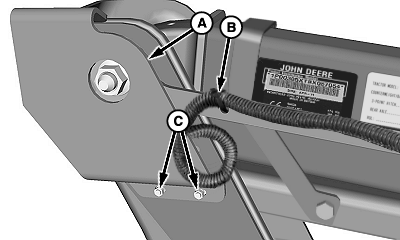
W22723-UN-25JUN12A - Cover
B - Tie Band
C - Nuts and Washers
Remove and retain nuts and washers (C) and outer cover (A). -
Cut tie band (B).
-
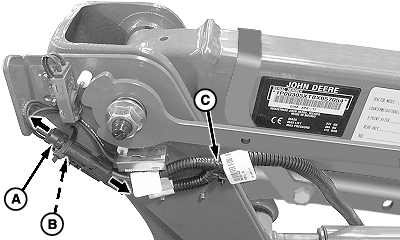
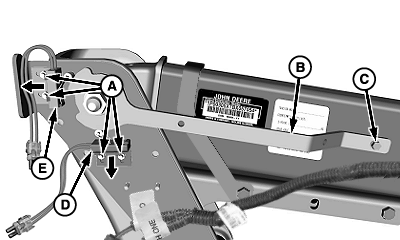
W22724-UN-25JUN12A - Plug (Switch One)
B - Plug (Switch Two)
C - Wiring Harness
Disconnect plugs (A and B) from connectors on wiring harness (C). -
W22725-UN-25JUN12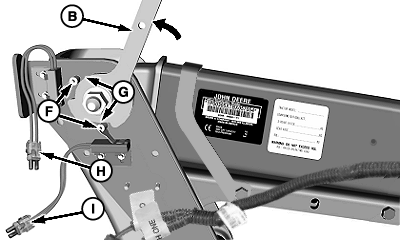
W22726-UN-25JUN12A - Nuts
B - Cam Arm
C - Self-Tapping Screw
D - Switch One
E - Switch Two
F - Rollers
G - Indentations
H - Plug (Switch One)
I - Plug (Switch Two)
Remove and retain self-tapping screw (C). -
Loosen nuts (A) and slide switches (D and E) to end of slots.
-
Rotate cam arm (B) upward until both switch rollers (F) are centered in cam indentations (G), as shown.
-
Slide each switch until roller (F) contacts center of cam indentation (G) and tighten nuts (A).
-
Using a continuity tester on plugs (H and I), confirm switch contacts are OPEN (no continuity) with cam arm raised.
-
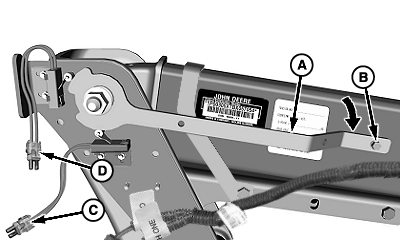
W22727-UN-25JUN12A - Cam Arm
B - Flange Head Self-Tapping Screw
C - Plug (Switch Two)
D - Plug (Switch One)
Lower cam arm (A). -
Install flange head self-tapping screw (B) through cam arm and into boom.
-
Using a continuity tester on plugs (C and D), confirm switch contacts are CLOSED (shows continuity) with cam arm down.
-
IMPORTANT:
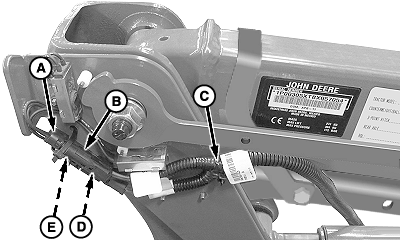
W22728-UN-25JUN12A - Plug (Switch One)
B - Connector (Switch One)
C - Wiring Harness
D - Connector (Swicth Two)
E - Plug (Switch Two)
Make sure plugs (A and E) are correctly installed in connectors (B and D).Install plugs (A and E) in switch connectors (B and D) as shown.
-
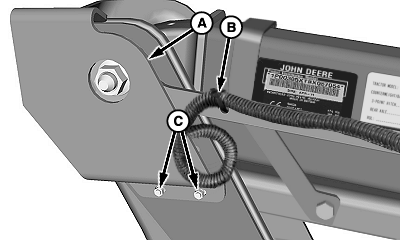
W22729-UN-25JUN12A - Cover
B - Tie Band
C - Nuts and Washers
Install new tie band (B) around wiring harness as shown. -
Install cover (A) and fasten using nuts and washers (C).
|
OUO6038,00020FA-19-20120628 |