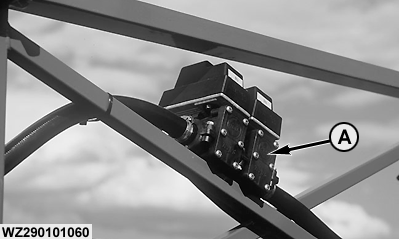
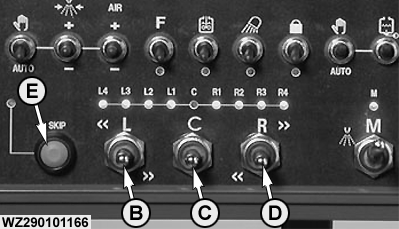
Electrical Boom Section ValvesFluid is transported to the left and right spray boom segments from the pressure filter. Using the boom section valves (A), between 4 and 13 sections can be operated, dependent on the version. The EHC-2 control box is capable of controlling up to 15 boom sections (L7-L6-L5-L4-L3-L2-L1-C-R1-R2-R3-R4-R5-R6-R7). The sections are shut on/off by electrically operated two-way ball valves integrated in the spray boom. In case of emergency the electric motor can be removed by removing the spring clip. Now the valve can be manually operated with a pair of pliers. Sequential Section ControlOperation of the boom section valves can be performed from the control box EHC-2. The control of the boom sections is sequential using three switches. The status of the boom section valves is shown with the red LEDs above the section switches "Left", "Center" and "Right". If the LED is ON the section is open, if the LED is OFF, the section is closed. With the left section switch "L" (B), boom sections can be closed from the leftmost outer side of the boom to the inner side (up to the right outer side if needed) by pushing the switch "L" to the right (left less). Each time the switch "L" is pushed to the right and released, one section more is closed from the leftmost ON section to the right. When there is no section ON, nothing happens. If section switch "L" (B) is pushed to the left (left more), boom sections can be opened from the leftmost inside of the boom to the left outside. Each time the switch "L" is pushed to the left and released, one section more is opened left to the leftmost ON section. When there is no section ON, then the right most section is switched ON first. With the Center switch (C) "C", the center section can be switched on and off, for booms with an uneven number of boom sections. The "C" switch can be pushed up or down and will jump back to the neutral position when released. The status of the "C" section can be read with the corresponding LED below "C". |
|
WZ00085,000003E -19-23JUN05-1/3 |
|
For booms with an even number of sections, the Center switch (C) "C" can be used to open and close the innermost boom sections L1 and R1 together. This makes it possible to open boom sections from the inner side to the outer side with section switches "L" and "R". With the right section switch "R" (D), boom sections can be closed from the rightmost outer side of the boom to the inner side (up to the left outer side if needed) by pushing the switch "R" to the left (right less). Each time the switch "R" is pushed to the left and released, one section more is closed from the rightmost ON section to left. When there is no section ON, nothing happens. If section switch "R" (D) is pushed to the right, boom sections can be opened from the right inner side of the boom to the right outside. Each time the switch "R" is pushed to the right (right more) and released, one section more is opened from the section right to the rightmost ON section. When there is no section ON, then the leftmost section is switched ON. Skip FunctionWith the SKIP function (E) it is possible to skip certain sections when operating the sequential boom section switches "L", "C" and "R". If the SKIP key (E) is pressed once, the green SKIP LED will go ON and the skip mode becomes active. If the skip mode is active, it is possible to skip over boom sections without changing the status. If the SKIP key is pressed again, the skip mode becomes inactive and normal operation is possible again. If the SKIP key is pressed, the leftmost and rightmost ON section LEDs will start flashing to indicate the current position of the cursors. With the "L" and "R" switches, it is then possible to skip along the different sections, without changing their status. If only a certain section needs to be opened or closed, the SKIP key needs to be pushed once again, after which the normal operation mode allows opening/closing of this section. If the SKIP key is pressed and held for 2 seconds, all boom sections will be ON at the same time. This special feature of the SKIP key is a convenient and fast way to open all sections together. |
WZ00085,000003E -19-23JUN05-2/3 |
|
Example: The operator of a sprayer with 9 boom sections (L4-L3-L2-L1-C-R1-R2-R3-R4) wants to open only the boom sections L4-L2-C. This can be done as follows, assuming that all boom sections were closed at the beginning: |
| Action | Sections Open | Mode | Cursor(s) (flashing LED) |
| Push switch "C" once | C | Normal Mode | |
| Push SKIP key | C | Skip Mode | C |
| Push switch "L" left | C | Skip Mode | C and L1 |
| Push switch "L" left | C | Skip Mode | C and L2 |
| Push SKIP key | L2-C | Normal Mode | |
| Push SKIP key | L2-C | Skip Mode | C and L2 |
| Push switch "L" left | L2-C | Skip Mode | C and L3 |
| Push switch "L" left | L2-C | Skip Mode | C and L4 |
| Push SKIP key | L4-L2-C | Normal Mode |
WZ00085,000003E -19-23JUN05-3/3 |