Automatic Trailing Functions of EHC-2 Control Box
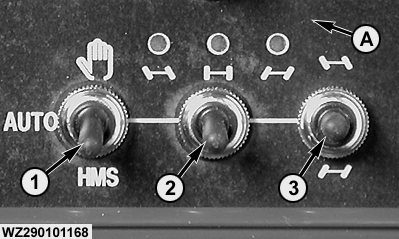
The EHC-2 control box is used to control the automatic trailing drawbar. There are three switches on the right hand lower corner of the control panel:
The selection switch (1) determines the status of the drawbar control and has three positions:
If the selection switch (1) is set to manual control, the operator can steer the drawbar with the manual switch (3). If the drawbar steering switch is pushed up, the drawbar will steer to the left. If the drawbar steering switch is pushed down, then the drawbar will steer to the right. This mode can be used to steer and correct the drawbar manually, e.g. when working on hillsides to correct the sprayer against drifting away or to manoeuvre the sprayer in field corners. In manual mode, the drawbar can be set back to the neutral position by pushing the automatic neutral switch (2) down once and releasing it. The drawbar will be automatically steered back to its neutral position. Three LEDs (RED - GREEN - RED) show the position of the drawbar (LEFT - CENTER - RIGHT). If the selection switch (1) is set to automatic control (AUTO), then the drawbar will be automatically steered so that the wheels of the sprayer follow exactly the rear wheel tracks of the tractor. |
|
WZ00085,0000043 -19-18FEB02-1/2 |
|
Spraying without HMS
When spraying in a straight line, it is recemmonded to switch off the tracking system (MAN position), to avoid excessive yawing of the spray boom. The selection switch must be set to AUTO before turning at the field headland. The drawbar will then be automatically steered. When starting on the following (straight) row, the automatic tracking system has to be switched off again by setting the selection switch to manual. By pushing the automatic neutral switch down once, the drawbar is brought back exactly to the centre position so that the sprayer runs straight behind the tractor. Spraying with HMSIf the drawbar selection switch is set to HMS (Headland Management System) the operation of the drawbar at the headland, as described above, will be completely automatic if the Master valve is activated, as follows:
|
WZ00085,0000043 -19-18FEB02-2/2 |