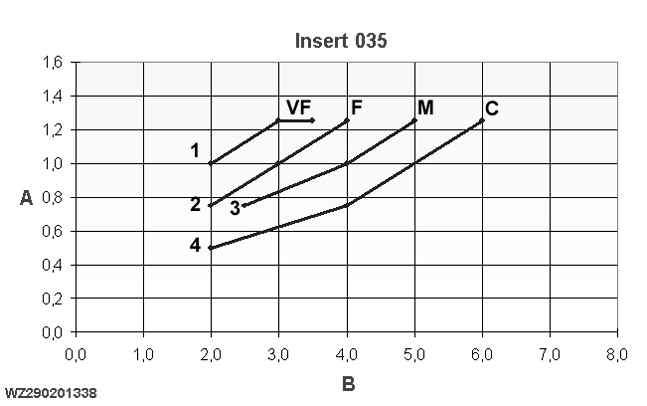
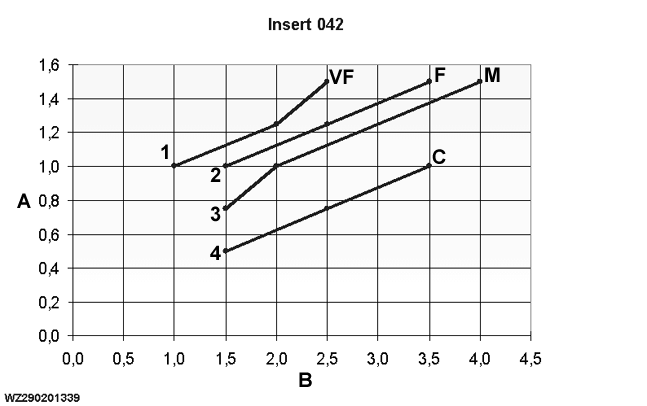
Ratio of Liquid/Air Pressure for the Standard Droplet Sizes
|
|
|
|
|
|
TwinFluid™ TKSS10/035
|
WZ00085,0000337 -19-08SEP06-1/3 |
|
|
|
|
|
|
TwinFluid™ TKSS10/042
Choice of droplet size Prior to spraying, a spray quality (droplet size) and application rate must be chosen. The droplet size and application rate can be set in the 'Sprayer - Main' page and 'Job Settings' respectively on the GreenStar 2™ display, based on a wind speed measurement. If the machine is stationary, the driver can do a wind measurement via the 'Job Settings' on the GreenStar 2 1 display. The controller then measures the wind speed for a certain length of time (standard 30 seconds) and then calculates the average value. This value is then displayed on the screen and the controller will give an advice on the droplet size to be |
set. If the "Do not spray", "Too much wind" message appears on the screen, the wind speed is too great for spraying purposes. Regardless of the advice given by the controller, the driver can still choose a different position (droplet size) if he wishes.
Choice of application rate
The application rate in l/ha must be set in the 'Job Settings' on the GreenStar 2 display. The liquid output of the TwinFluid™ nozzles depends on the air and liquid pressure. The liquid output for the standard TwinFluid 2 version with 035 insert and TK-SS10 flow tip is given in "Liquid Output for TwinFluid Nozzles" in the "Working with the Machine" section. |
WZ00085,0000337 -19-08SEP06-2/3 |
A lower liquid output can be set for a finer droplet size than for a coarser droplet. After all, a fine droplet gives the same degree of coverage at a lower liquid output (no. of droplets / cm 2 ) as a coarser droplet with a higher application rate. We therefore advise the |
programming of the following standard setting, based on a driving speed of 6 km/h:
The combination of droplet size and liquid output determines the degree of coverage. Lower volumes can be sprayed using a finer droplet, a higher liquid output is advised for a coarser droplet in order to compensate the degree of cover as far as possible. Of course, a higher output with a finer droplet gives an even better degree of cover. Our advice is to carry out spraying work which requires intensive coverage with a fine or very fine droplet where possible (e.g. position VF or F on the GreenStar 2 display). |
||||||||||||||||||||||||||||||||||||||||||||||||||||||||||
WZ00085,0000337 -19-08SEP06-3/3 |