Connect the public road travelling lights on the tractor.
Connect the CAN-Bus communication cable with plug from the sprayer to the ISO 11783 connector on the tractor.
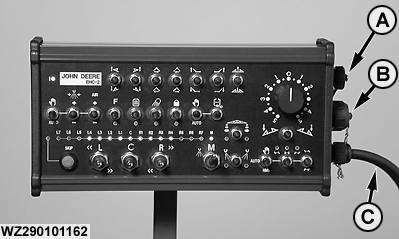
Connect the control box to the tractor CAN Bus line by connecting the cable with connector from the control box to the splitter with socket (C).
The control box has three connections on the right-hand side (standard):
If required, the top connector (A) can be used to connect a speed sensor (for working with other equipment). This connection is not used during the operation of the trailed sprayer. The speed signal is generated by the wheel sensor of the sprayer and transmitted via the receiver box through the CAN Bus to the tractor and GreenStar 2 display.
The middle connector (B) on the control box (8-poles) is a RS-232 communication port, which can be used for external communication of the sprayer control system by factory personnel, e.g. for diagnostics or software updates.
The lower connection with cable and plug (C) is used to connect the EHC-2 control box to the CAN Bus system.
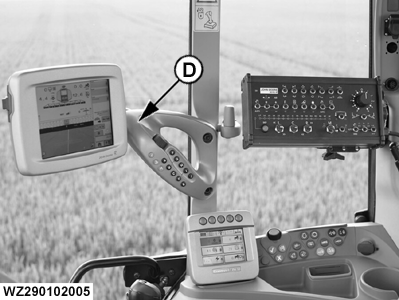
Connect the GreenStar 2 display (D) to the implement CAN Bus.
A-External speed input for control box (not used)
B-RS-232 communication port (for software updates or optional N-sensor)
C-Control box (14-pole) CAN Bus connector
D-GreenStar 2 display connected to implement CAN Bus