Digital Tank Level Indicator with Filling Alarm

If a tank pressure sensor is fitted in the bottom of the tank, it is possible to read the actual tank volume accurately in the GreenStar display. The tank pressure sensor is a very sensitive electronic component and must not be struck or cleaned with high pressure, as the sensor could be damaged.

The filling alarm can be used to fill the tank very accurately.

    The filling of the tank with filling alarm has to be done as follows:

  • Connect the filling hose to the suction unit of the sprayer
  • Set switch 9 of the EHC-2 control box to automatic filling (AUTO)
  • Set the four way suction valve(s) to "External Suction"
  • Set the pressure selection valve to "Pressure-Free Filling".
  • Select "Job Settings" with softkey G (or button G on the GreenStar display control).
  • "Tank Filling" is selected with softkey A (A on display control), a new screen will appear.
  • Highlight and select "Desired Tank Content", type in the value on the pop-up numeric keypad and enter.
  • Enter the "Density" of the liquid, highlight the field and with the scroll wheel, the value will increment or decrement dependent which direction the wheel is rotated.
  • Select the "Start" button, in the lower right corner of the screen to activate the process.
  • Start the engine and let the pump run.
  • There are three steps to the process indicated by the numbers 1 to 3 under the screen title, the current step is highlighted in green.
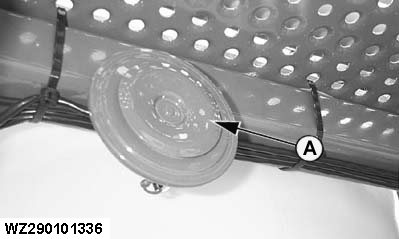
  • When the desired tank volume is reached, the horn (A) on the machine will give an audible alarm lasting 10 seconds. Switch 16 of EHC-2 control box needs to be set to "Suction from Tank", otherwise the horn will sound continuously.
WZ290101336


A-Horn

WZ00232,0000017 -19-13SEP06-1/1