General Information
|
|
|
|
|
|
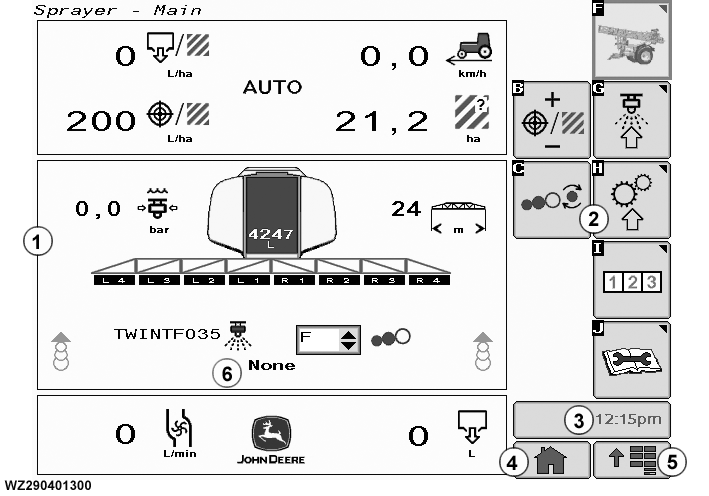
The GreenStar 2™ Display is a multipurpose display with easy-to-use, menu-driven commands, with several information display fields. The page shown in display field (1) is the standard (default) sprayer main page layout. This can be changed to suit your needs and requirements via drop-down menus (see "Main Page Layout (softkey A)" in "Machine Settings (softkey H)". Menu field (2) softkeys will cause another page to appear on screen or will start a process:
|
Time Indicator (3) displays the current time. Home page (4) allows the operator to view their own assembled Home Page which is constructed with "Layout Manager" in the "Application Menu" (5). The "Application Menu" (5) shows the operator a menu list of available applications. Time indicator (3), Home Page (4) and Application Menu (5) appear on all screens. Message Field (6) allows the operator to view cautions and warnings that may occur while working with the machine. "None" is displayed when there are no messages. |
WZ00232,0000024 -19-13OCT06-1/2 |
|
Screens shown in this documentation may vary from your screens slightly, due to the sprayer configuration, its setup and the software version. The application software for the John Deere 832i, 840i and TwinFluid versions of sprayers is designed for the GreenStar 2™ displays 2100 & 2600. Compatible (to ISO 11783) ISOBUS displays can also be with this |
application. The layout of the screens will be a slight variation on those shown in this documentation.
NOTE: There is NO Power On/Off switch for the display. Power is applied when the tractor is turned ON. At initial start-up the GreenStar 2 Display will show the "Sprayer Main" screen. |
WZ00232,0000024 -19-13OCT06-2/2 |