Sprayer - Main
|
|
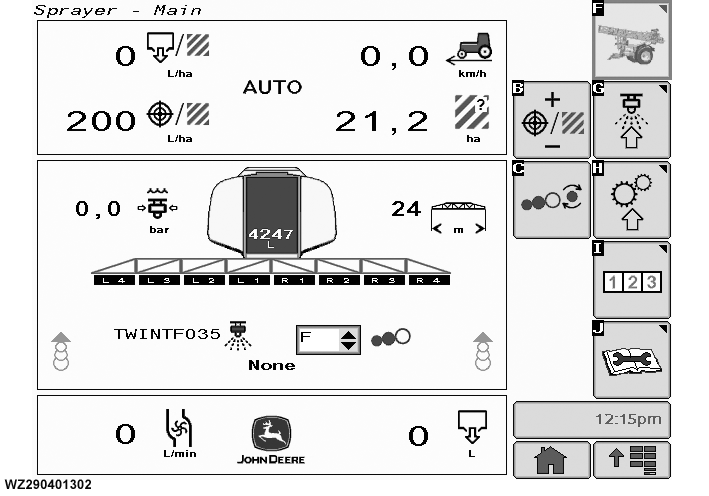
"Sprayer - Main" can be found by selecting softkey F in the "Menu field". The layout display for each of the 8 display fields can be selected from a drop down menu (see "Main Page Layout (softkey A)" in "Machine Settings (softkey H)". The display field also includes information on: |
operating in manual (hand symbol) or automatic (AUTO).
|
WZ00232,0000025 -19-12OCT06-1/3 |
|
Sprayer - Main Symbol List
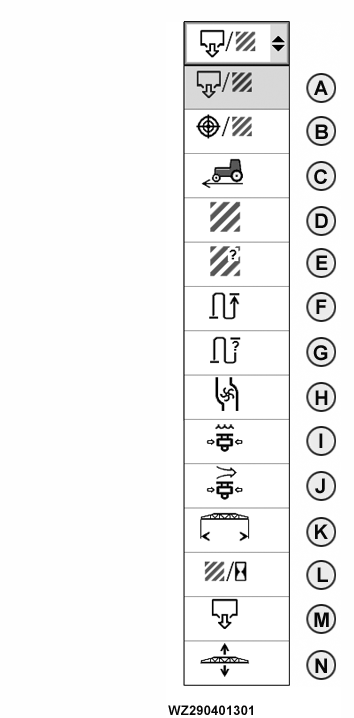
A - "Applied rate": shows the actual application rate in L/ha. B - "Target rate": shows the target application rate in L/Ha. When spraying (main shut-off valve open), the operator can go directly to a boost selection screen (Boost Mode) by selecting softkey D. When not spraying, the operator can go to the "Job Settings" Menu by selecting softkey G. When working in manual mode (MAN/AUTO Switch No. 2 on the control box set to MAN position) then only "Manual Rate Control" is shown. C - "Current speed": shows the speed of the sprayer in km/h. If a simulated speed has been selected (see "General Settings" tab in "Machine Settings") and the sprayer is not running, the simulated speed is shown. D - "Sprayed area": shows the sprayed area in hectares. E - "Remaining area": shows the remaining area that can be sprayed with the current tank content and actual application rate. F - "Sprayed distance": the distance travelled during the spraying of this field. G - "Remaining distance": shows the remaining distance that can be sprayed with the current tank content, boom width and actual application rate. H - "Actual flow rate": shows the actual total flow rate in L/min. I - "Liquid pressure": shows the liquid pressure in bar. J - "Air pressure" (TwinFluid only): shows the air pressure in bar in the field, if Twin Fluid nozzles are selected in Job Settings. If a conventional nozzle is selected then only the liquid pressure will be shown in bar. K - "Spray boom working width": shows the actual active working width of the boom. L - "Current performance": shows in ha/h the current performance at the present speed and settings. |
|
WZ00232,0000025 -19-12OCT06-2/3 |
|
M - "Total sprayed volume": shows the sprayed volume of the current field in liters. N - "Spray boom height" (BoomTrac only): shows the actual boom height when BoomTrac ™ is fitted. |
|
BoomTrac is a trademark of Deere & Company | WZ00232,0000025 -19-12OCT06-3/3 |